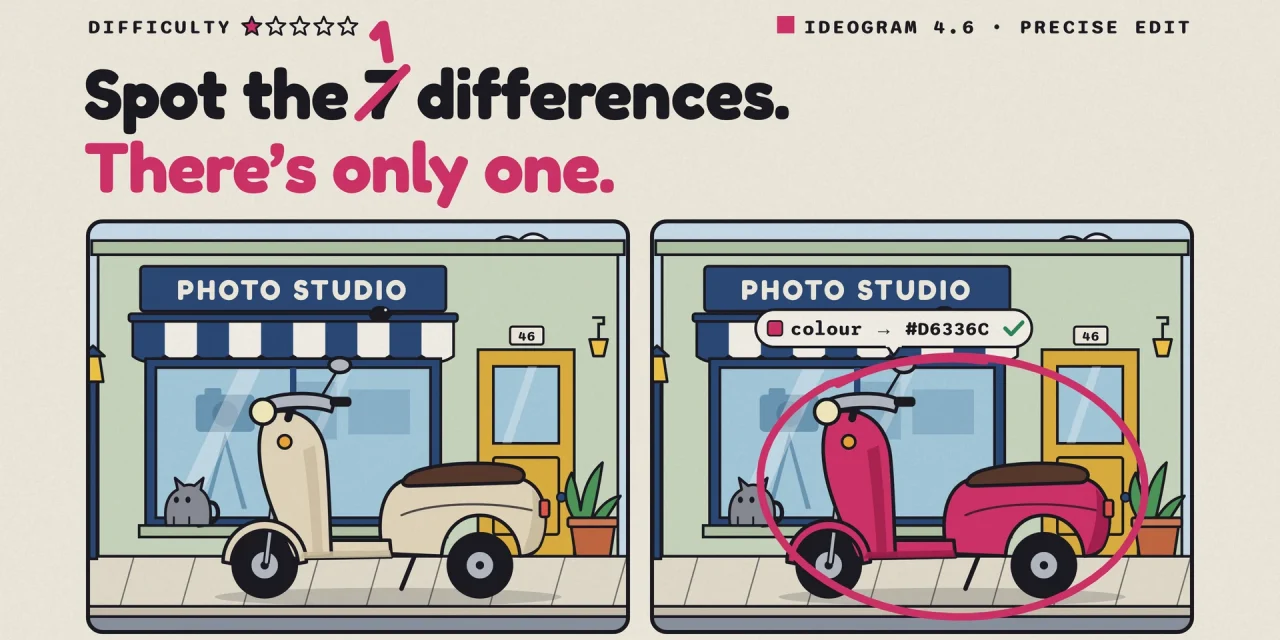
Ideogram 4.6 generates and edits images in native 4K and, with its Precise Edit mode, changes only the part of an image you ask it to change. Everything outside that area is copied pixel for pixel from your source file. Ideogram released the model on 19 November 2026 and pitches it squarely at e-commerce and product photography. In its own tests, 4.6 hit a requested brand colour in 83 percent of cases, against 46 percent for Ideogram 4.5.
For brand and e-commerce teams in Europe, the pixels are only half the story. The independent leaderboard Ideogram points to shows 4.6 statistically level with 4.5, a high-quality 4K edit costs $0.60, the promised open weights have no date or licence yet, and the app and the API treat your images very differently. Below: what the model does, what the numbers support, what it costs per usable image and what to settle before your team relies on it.
What Ideogram 4.6 is
Toronto-based Ideogram built its name on images with text you can actually read, from posters to packaging. In June it released Ideogram 4.0 with downloadable weights, and on 30 September it followed with Ideogram 4.5, a model built for repeated edits. Version 4.6 adds native 4K output, better accuracy on colours and characters, and what Ideogram describes as more realistic skin without the waxy AI look.
There are two ways in. Generate creates an image from a text or JSON prompt; add up to five images and it edits the first one using the others as references. Precise Edit starts from an existing image and changes one part, optionally inside a mask you draw. The output keeps the dimensions of your source, and every result can become the source of the next edit.
Sizes are free on a 32-pixel grid, up to 4096 by 4096 and as wide as 6 to 1, according to the Runware documentation. The model is in the Ideogram app’s model picker as it rolls out to accounts, in the API and with partners including Leonardo, Runway, fal, Luma and ComfyUI. It is not fast. Through Runware a generation typically takes around 50 seconds and an edit around 25.
How Precise Edit differs from regenerating
Ask most image models to change one thing and they redraw the whole picture. Three or four rounds later a face has shifted, a shadow has moved or a colour has faded. That drift is why designers rarely trust AI edits beyond the first pass. Precise Edit copies everything outside the changed area straight from the source, and Ideogram’s launch thread promises “significantly less pixel drift outside your edits”.
On Runware, Precise Edit accepts sources up to 8192 by 8192 pixels. Limit the edit to one region and a 4K or 8K photo stays at full resolution. You can add up to four reference images, or three when you use a mask, for jobs such as placing a logo on a bag or swapping a product inside an existing ad.
What the numbers support, and what they do not
Ideogram leads the Rapidata Multi-step Image Edit leaderboard. The test takes 199 photos of real people and has each model make five edits in a row to clothing, objects or text, never to the face. Human raters then compare the face after step five with the original. Across 413,667 judgments, 4.6 scores 1892, ahead of Ideogram 4.5 at 1866 and ByteDance’s Seedream 5.5 at 1805. OpenAI’s GPT Image 2.6 Sunburst ranks eleventh and Google’s Nano Banana Pro twelfth.
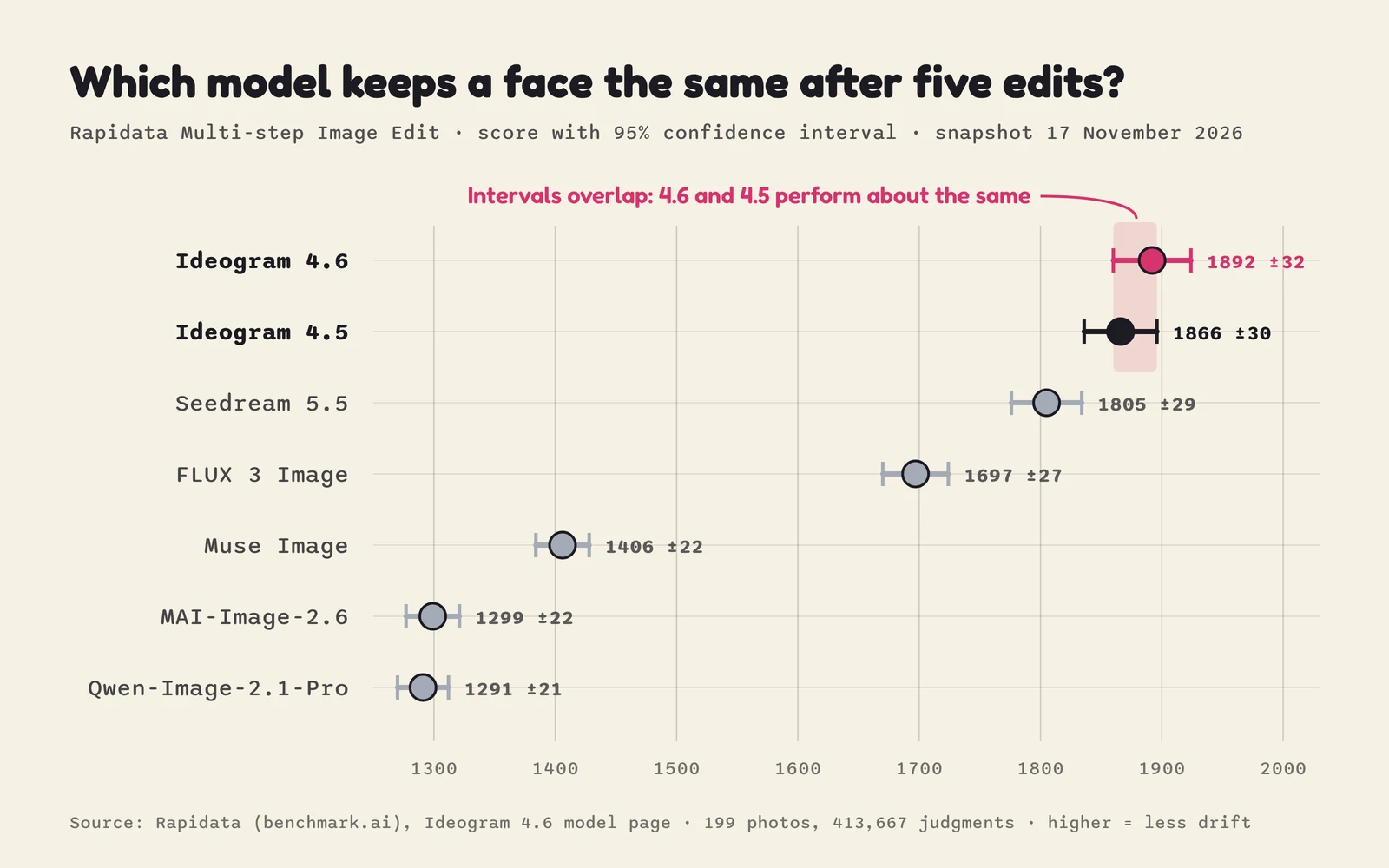
Look at the error bars. The interval is plus or minus 32 for 4.6 and plus or minus 30 for 4.5, and they overlap almost entirely, so on this leaderboard the two versions perform about the same. What the test does show clearly is the distance to the rest of the field. The benchmark also measures one thing only: whether a face survives five edits. It says nothing about text, colour or product detail.
For those tasks Ideogram published its own figures. It ran the same requests through 4.5 and 4.6 at high quality and counted how often the result was usable. The jumps are much larger there, especially for colour and products.
The vendor defines what counts as usable, and no independent test of these tasks exists yet. An early hands-on review by a developer who runs a multi-model image site points the same way: text on a poster and a coffee bag was spelled correctly on the first try, 4K output really was 4096 by 4096, and a second edit changed only the coat, he reports on dev.to. That is six images at medium quality, not a benchmark.
Text remains the family’s strength, within limits. In Runware’s text and design guide, some one-line descriptions on a nine-item menu landed under the wrong dish, while names, prices and short small print rendered reliably. Keep longer copy in your layout software and put every string that must appear in quotation marks.
What Ideogram 4.6 costs
The API charges per image by quality and resolution. Editing costs more than generating, and the editing rate applies both to Precise Edit and to Generate with source images. Anything below 2K is billed at the 2K price. These are the list prices on Ideogram’s 4.6 model page.
| Quality | Generate 2K | Generate 4K | Edit 2K | Edit 4K |
|---|---|---|---|---|
| Very low | $0.008 | not available | $0.008 | not available |
| Low | $0.03 | $0.06 | $0.03 | $0.06 |
| Medium | $0.06 | $0.12 | $0.06 | $0.20 |
| High | $0.10 | $0.20 | $0.22 | $0.60 |
At 2K nothing changed from 4.5. 4K is new and that is where costs climb: a high-quality 4K edit costs three times a new 4K image and almost three times the same edit at 2K. For comparison, Google lists a 4K image from Nano Banana 2.1 at $0.113.
The list price is not the number that matters for a catalogue, though. A 2K high-quality recolour costs $0.22 on both 4.5 and 4.6. If Ideogram’s own rates hold for your products, 4.5 needs a little over two attempts per usable brand colour and 4.6 a little over one, which brings the cost per usable image down from about $0.48 to about $0.27. Draft at 2K on low or medium, and render only the approved final at 4K.
In the app, prices are in credits, and one credit equals one US cent. The free plan gives 30 credits a week to accounts that sign in with Google or Apple, but everything you make is public and you can edit at most ten images. Plus costs $20 a month, or $15 on a yearly plan, for 2,400 credits; Team costs $30 per user per month, or $20 yearly, for 3,600 credits per user. The credit cost of a 4.6 image was not on the pricing page on 22 November; the Generate button shows it before you click.
Open weights, but probably not open for business
When 4.5 launched, Ideogram promised open weights, and they did not arrive. Asked about them on X, the company now says it will “skip 4.5 open and go directly to 4.6 open”, without a date or a licence, i10x reports.
Do not budget on free commercial self-hosting. The 4.0 weights are on Hugging Face under a non-commercial licence for research, evaluation and personal projects, and Ideogram’s licensing page requires a commercial licence to self-host the model in a product. Only the inference code is Apache 2.0. For teams that want image editing on their own infrastructure for data reasons, that licence negotiation is the real timeline.
What European teams should settle first
Keep unreleased products off the free plan. Everything made on the free tier is public. From Plus upwards, new images stay private until you publish them, which is the minimum for campaign work or anything under embargo.
Know which channel trains on what. Ideogram’s privacy policy lists training its models among the uses of the data it collects, and EU users can object through privacy@ideogram.ai. The API terms say the opposite for the API: inputs and outputs are not used for training, except content that breaches the usage policies. The API terms do not say where data is processed and do not mention a data processing agreement, so ask for one before you send customer or employee images. Partners such as Runware offer a zero data retention option for the model.
Treat people in reference images as personal data. Keeping a mascot consistent across a campaign is straightforward. Keeping a model, an employee or a customer consistent means processing personal data under the GDPR, and the API terms explicitly prohibit images of individuals without their consent.
Plan your own labelling. Article 50 of the AI Act has applied since 2 August 2026, as our AI Act timeline explains. Whoever publishes a realistic image of a real person, place or event that looks authentic must disclose that it is AI-generated or manipulated. Providers of image generators must also mark outputs in a machine-readable way; for systems already on the market before 2 August, the European Commission gives them until 2 December 2026.
OpenAI and Google attach C2PA metadata or an invisible watermark to their images. We found nothing comparable documented for Ideogram, whose model page asks users to label AI-edited content where required, and according to the Commission’s guidelines, as Reed Smith summarises them, a deployer cannot rely on the provider’s marking for its own disclosure duty. How detection holds up in practice is covered in our piece on Reality Defender.
Make sure the colourway exists. Recolouring a bag to your brand colour is not a deepfake. Showing a colour you do not sell on a product page is a question for EU consumer law on misleading product information.
A one-week pilot for a brand team
Ideogram itself recommends comparing 4.6 with 4.5 on your own images before migrating a workflow. A pilot that answers the questions above fits in a week and costs a few dollars in API fees.
- Pick twenty real product shots, two portraits with signed consent and three pieces of packaging or signage with text.
- Recolour five products to your exact hex codes and measure the result with a colour picker rather than by eye.
- Run five consecutive edits on each portrait and put step five next to the original.
- Generate a poster with your own copy in every EU language you publish in, including accents and prices, and have a native speaker proofread it.
- Run everything at 2K medium in 4.6, in 4.5 and in your current tool, such as ChatGPT Images 2.6. Re-render only the winners at 4K high.
- Log attempts, cost and approval per image, and keep originals, prompts and outputs together, as Ideogram’s model page advises.
Need cut-outs? Set the background to transparent and you get a PNG or WebP with a real alpha channel. For segmenting existing photos in-house, open models such as Tencent’s WeVisOne-VL are an alternative.
Frequently asked questions
Can Ideogram 4.6 be used commercially?
Yes. Ideogram’s terms allow commercial use of outputs, and you remain responsible for third-party rights such as logos, trademarks or recognisable people in your source images.
Is Ideogram 4.6 better than 4.5?
On the independent five-step editing leaderboard the two score about the same. In Ideogram’s own tests 4.6 is clearly better at exact colours, product detail and characters, and only 4.6 works in 4K.
Does Ideogram 4.6 mark its images as AI-generated?
We found no documentation of C2PA metadata or an invisible watermark from Ideogram. Under the AI Act, providers must mark generated images in a machine-readable way, and publishers must disclose realistic deepfakes themselves either way.
Are the Ideogram 4.6 weights open?
Not yet. Ideogram says it will release 4.6 as open weights but has given no date or licence. The earlier 4.0 weights are free for non-commercial use only.
Precision moves the risk from the pixels to the process
Drift used to be a quality problem and an accidental safeguard: a heavily edited image usually looked edited. A model that leaves every untouched pixel alone removes both. The better Precise Edit works, the harder it becomes to see afterwards what was changed, by whom and why. That makes the edit log, the approval step and the provenance label more important, not less. Teams that adopt 4.6 for its precision should adopt the paperwork with it.