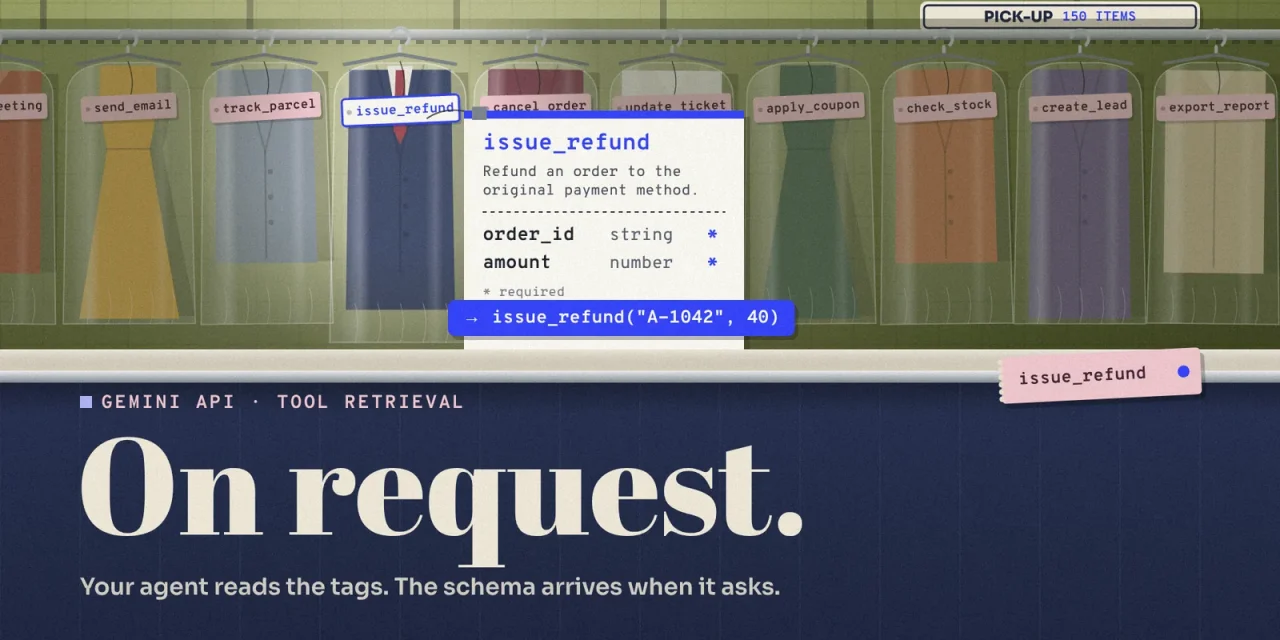
On 19 November, Google added Tool Retrieval to the Gemini API. Instead of sending the full definition of every tool with every request, developers can now let an agent see only each tool’s name and a short description, and load the complete parameter schema when a task actually needs it. Search, loading and the function call happen within the same request. For agents connected to dozens or hundreds of tools, that cuts input tokens and keeps tool selection accurate. For an agent with a handful of tools, it saves little and can even cost more.
The feature is in preview in the Interactions API, works with Gemini 3.6 and later, and has no separate price. Google is also the third major AI provider to ship the same pattern, with the same parameter name, in twelve months. This article explains how it works, what it saves and when it does not, what changes for governance, and what European teams should check before switching it on.
What is Tool Retrieval in the Gemini API?
An AI agent acts through tools: functions it can call to issue a refund, look up a customer or book a meeting. Each tool comes with a JSON schema that describes its parameters. Until now, every request carried every schema, including those of tools the agent would not use in that turn. Tool definitions are a fixed part of the harness around the model, and you pay for them again on every call.
That adds up quickly. Measurements compiled by Unblocked in May 2026 put the average tool schema at 300 to 600 tokens. Anthropic estimates that a common setup of five MCP servers, including GitHub, Slack and Sentry, consumes around 55,000 tokens of tool definitions before the agent does any work. It also costs accuracy. According to Anthropic’s documentation, a model’s ability to pick the right tool degrades once it sees more than 30 to 50 tools at once.
Tool Retrieval keeps the whole library available but defers each schema until a task calls for it.
How a single request works
Developers turn it on with two changes to a request:
- Add a tool of the type
tool_search. - Set
defer_loading: trueon the tools to hold back.
The model then sees the name and description of each deferred tool, but not its parameters. When it needs one, it requests the tool by name. The API loads the schema and the model emits the function call. The application runs the function and returns the result, exactly as with regular function calling.
In Google’s example, a customer reports that order A-1042 arrived damaged and asks for a 40 dollar refund. The model searches for issue_refund, receives the schema with order_id and amount, and calls the function with A-1042 and 40. The response shows three steps, tool_search_call, tool_search_result and function_call, so teams can see which tools the model considered. The example runs on Gemini 4 Hydrogen.
tools = [
    {"type": "tool_search"},
    {
        "type": "function",
        "name": "issue_refund",
        "description": "Refund an order to the original payment method.",
        "defer_loading": True,
        "parameters": {
            "type": "object",
            "properties": {
                "order_id": {"type": "string"},
                "amount": {"type": "number"},
            },
            "required": ["order_id", "amount"],
        },
    },
    # ... the rest of your deferred tools
]

interaction = client.interactions.create(
    model="gemini-4-hydrogen",
    input="Order A-1042 arrived damaged. Please refund 40 dollars.",
    tools=tools,
)
Google recommends leaving frequently used tools undeferred, so they stay callable without a search step. The search itself runs on Google’s servers, so there is no index to build or host.
Server-side or client-side, who holds the catalogue?
By default, Google runs the search. Teams can also run it themselves by declaring the search tool with "execution": "client", a name, a description and a query parameter. When the model calls that search tool, the application looks up matching tools in its own registry and returns their full definitions. The conversation continues through previous_interaction_id.
This is the more interesting option for organisations. With client-side retrieval, the tool catalogue and the rules about who may use which tool stay in your own systems. Tools do not have to be declared up front, so new ones can appear mid-conversation, for example when a user connects an integration. The cost is one extra round trip per search.
| Server-side, default | Client-side | |
|---|---|---|
| Who searches | Google, on names and descriptions | Your application, with your own logic |
| Tools declared up front | Yes, with defer_loading | No, returned after a search |
| Access rules | Whatever you put in the request | Enforced in your registry, per user or role |
| Extra round trip | No | One per search |
| Deferring whole MCP servers | Yes | No |
| Best fit | A large, stable tool library | Permissions per user, an existing registry, tools added during a session |
The two modes cannot be combined in one request, and defer_loading only applies to server-side retrieval.
Deferring an entire MCP server
For remote MCP servers in the Gemini API, setting defer_loading: true on the mcp_server entry defers every tool that server exposes. The API executes those tools itself and reports them as mcp_server_tool_call and mcp_server_tool_result. This only works with server-side retrieval, and the documentation only mentions remote MCP servers.
This is where the largest savings are. A single SaaS vendor’s MCP server easily exposes dozens of tools, and an organisation that connects three or four of them is in the hundreds. One flag per server keeps that manageable.
What it costs, and when it does not pay off
Tool Retrieval has no separate charge. Standard model rates apply, but several things count as input:
- The search tool adds a small, fixed block of input tokens.
- Each deferred tool still adds its name and short description.
- Each schema the model loads is billed as input for the rest of the conversation, just like a tool declared up front.
- Each server-side search is an extra model call. Its prompt tokens appear separately in
total_tool_use_tokensand are billed at the input rate.
Google says savings come when the schemas you do not load outweigh the ones you do, and advises measuring against real traffic. A worked example shows where the line falls. We assumed 400 tokens per schema, 25 tokens per name and short description, and 500 tokens for the search block. Google gives no figure for that block. 500 is what Anthropic states for its own search tool.
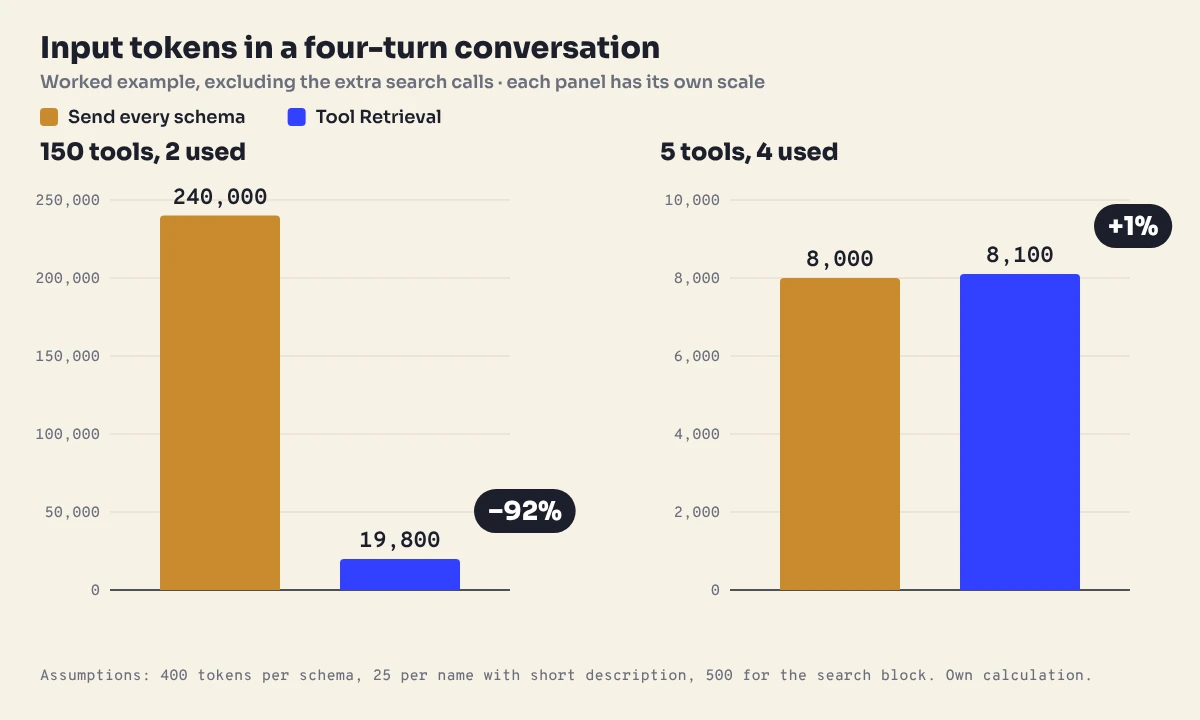
An agent with 150 tools that uses two of them in a four-turn conversation sends 240,000 input tokens without Tool Retrieval and about 19,800 with it, a 92% reduction. An agent with five tools that calls four of them in the first two turns goes from 8,000 to 8,100 tokens, before the search calls are added. The documentation recommends static loading for fewer than 20 stable tools for that reason.
Caching narrows the gap in money. Gemini applies implicit caching when the start of a prompt repeats. On Gemini 4 Hydrogen, a cached input token costs 0.075 dollars per million instead of 1.50. If the 150 schemas sit unchanged at the front of every turn and the cache hits, the static version in our example falls from 0.36 to about 0.10 dollars per conversation. The deferred version costs about 0.03 dollars, plus search calls. Deferring can also push a medium-sized prompt below the minimum size for caching. Measuring on your own traffic is the only way to know.
Accuracy may matter more than the bill. Anthropic measured that its Opus 4 model picked the right tool in 74% of cases instead of 49% on evaluations with large MCP libraries once deferred loading was on. Google has not published comparable figures for Gemini.
Three providers, one pattern
Google is the last of the three large API providers to ship this. Anthropic introduced its Tool Search Tool in November 2025, with the same defer_loading: true flag. OpenAI followed in March 2026 with tool search for GPT-5.4, again with defer_loading and a choice between hosted and client-executed search.
| Provider | Since | How to enable | Published result |
|---|---|---|---|
| Anthropic | 24 November 2025 | Search tool and defer_loading | 85% fewer tokens, Opus 4 picks the right tool in 74% instead of 49% of cases |
| OpenAI | 5 March 2026, GPT-5.4 | tool_search and defer_loading | 47% fewer tokens at equal accuracy, on 250 tasks with 36 MCP servers |
| 19 November 2026 | tool_search and defer_loading | No figures yet |
OpenAI’s 47% comes from 250 tasks on Scale’s MCP Atlas benchmark, as reported by The Decoder and others. For organisations, the convergence matters more than any single number. A tool catalogue organised into a small core and a deferred long tail, with clear names and descriptions, now carries over between providers. The details still differ. OpenAI recommends grouping tools into namespaces of fewer than ten functions, and Anthropic ships ready-made regex and BM25 search tools. Google does not say how its own server-side search works. Keeping the catalogue outside any single provider, as argued in models are rented, context is owned, gets easier when all three read it the same way.
What European teams should check first
- It is a preview on one API. Tool Retrieval runs in the Interactions API in v1beta, not in
generateContent, and the interface may change before general availability. - Data retention. By default the Interactions API stores interactions, for 55 days on paid projects and one day on the free tier, according to Google’s documentation. With
store=falsenothing is kept, but you then replay every step unchanged, including signatures. Leaving outtool_search_resultraises no error, yet silently drops the loaded schemas. - Where it runs. Tool Retrieval is documented for the Gemini Developer API. On Google Cloud’s Gemini Enterprise Agent Platform, the Interactions API is labelled experimental, and the managed agents guide lists only the global location. Teams that need EU processing should confirm availability and endpoint before building, as we noted for Hydrogen’s EU multi-region.
- Descriptions become a control surface. The model chooses on names and short descriptions only. Vague or overlapping descriptions lead to the wrong tool, so they deserve the same review as an internal API. Google recommends prefixing names by service, such as
billing_get_customerandcrm_get_customer. - Loaded tools stay loaded. A schema the model retrieves remains in context for the rest of the conversation. There is no unloading.
- Keep named tools loaded. Do not defer tools that system instructions or tool outputs mention by name, or the model may call them without a search and the API returns an error.
- The steps are evidence.
tool_search_callandtool_search_resultshow which tools an agent looked for and received. Logging them gives you a record of what an agent considered, which helps when someone asks why it acted, and fits with the controls we described for AI agent sandboxes.
A five-step rollout
- Measure first. Log input tokens per request with and without tool definitions.
- Define the core. Keep the three to five tools almost every conversation uses loaded. Defer the rest.
- Rewrite names and descriptions. Put the service first in the name and make the first sentence say what the tool does. Long descriptions can use the separate
short_descriptionfield. - Pilot in staging. Compare tokens and tool choices, and read
interaction.stepsto see what the model searched for. - Switch it on where it pays. Only where savings exceed the search block and the search calls combined.
Frequently asked questions about Tool Retrieval in the Gemini API
Does Tool Retrieval cost extra?
No. Standard model rates apply. The search block, loaded schemas and search calls do count as input tokens.
Which models support Tool Retrieval?
Gemini 3.6 Flash, Gemini 3.8 Flash and all Gemini 4 models: Hydrogen, Neon, Argon and Carbon. Older models return an error.
Does it work with generateContent?
No. Tool Retrieval is only available in the Interactions API, in v1beta.
When should I not use it?
With a small, stable set of fewer than 20 tools, or when an agent uses most of its tools in most conversations. Then the search costs more than it saves.
Does Tool Retrieval work with MCP?
Yes, with remote MCP servers. Set defer_loading: true on the server and Google searches and loads its tools on demand.
Should we use server-side or client-side retrieval?
Server-side for a large, stable library. Client-side when you already have a tool registry, need permissions per user, or add tools during a session.
The catalogue is the new interface
With Tool Retrieval, the model no longer reads a full manual. It reads a list of names with one line each, and that line decides whether the agent finds the right tool. A tool with a vague description will simply not exist for the model. Organisations that give every tool a clear name and a precise first sentence gain twice: fewer tokens, and an agent that finds what it is looking for, on Google and on the other two.