OpenAI made GPT-Live-1.1 available in its API on 19 November, five weeks after the model became the voice of ChatGPT. The price per minute is unchanged at $0.05, but the release comes with a new standby setting that bills the silent stretches of a WebRTC session at $0.02 per minute. For organisations that keep a voice agent open at a front desk, in a shop or inside an app, that changes the economics more than the model upgrade does.
This article covers what 1.1 improves, how much standby saves on a realistic session, why the backend model behind the voice matters more than the voice itself, and what European teams should check before they put GPT-Live in front of customers.
What GPT-Live-1.1 changes for developers
GPT-Live is OpenAI’s full-duplex voice model. It listens while it speaks, so callers can interrupt it, and it hands reasoning and tool calls to a separate text model while it keeps the conversation going. GPT-Live-1 reached the API on 10 September. Version 1.1, with the model ID gpt-live-1.1, has run ChatGPT Voice for Plus, Pro and Business users since 15 October.
According to the model page, 1.1 transcribes speech more accurately than GPT-Live-1, keeps a more consistent accent and voice when the conversation switches language, and lets you describe in plain language when the model should hand a task to your backend. OpenAI’s developer announcement adds better handling of letters and numbers, better instruction following and more reliable task completion. The rest stays the same: audio and text in and out, function calling, no structured outputs, and the same context events as GPT-Live-1. The two models have separate concurrency limits.
OpenAI published no benchmark figures with the release, and Artificial Analysis has not yet tested 1.1. Its predecessor scores 83.2 on the Speech to Speech Index when paired with GPT-6 Astra, behind Phonic 1 at 87.1 and Grok Voice 3.0 at 86.9 and ahead of Eleven Realtime Max at 77.3.
For multilingual Europe, the voice list deserves a look. OpenAI’s live conversations guide names dedicated voices for English, Portuguese, German, French, Hindi, Japanese and Korean. Dutch, Italian and Polish have none, so those conversations run on one of the general voices. A developer on OpenAI’s forum also points out that new voice IDs show up in the API before they are documented.
How standby changes the cost of an open session
Standby works with both GPT-Live-1 and 1.1. You set an idle timeout between 5 and 60 seconds. When nobody has spoken for that long, the model pauses while the WebRTC call stays open, and the conversation resumes as soon as someone speaks. A paused minute costs $0.02 instead of $0.05. OpenAI bills voice sessions per second, and the backend model and tools are billed separately at their own rates.
Two limits matter. The documentation only mentions WebRTC, which is the browser and app connection, so phone agents over SIP and server-side WebSocket sessions should not count on it until OpenAI says otherwise. And standby can never cut the voice bill by more than 60 per cent, because a paused minute still costs two fifths of an active one.
Take a voice assistant that stays open for an hour at a reception desk. Visitors use it ten times and talk for twelve minutes in total. Each silence starts with the timeout at the full rate, then drops to standby:
| Setting | Billed as active | Billed as standby | Voice cost per hour |
|---|---|---|---|
| No standby | 60 min | 0 min | $3.00 |
| Timeout 60 s | 22.0 min | 38.0 min | $1.86 |
| Timeout 10 s | 13.7 min | 46.3 min | $1.61 |
| Timeout 5 s | 12.8 min | 47.2 min | $1.59 |
Our own calculation with OpenAI’s list prices on 22 November 2026, voice layer only. Over a year of ten hours a day on 300 days, the same kiosk costs $9,000 in voice minutes without standby and about $4,830 with a 10-second timeout.
The table also shows that the timeout length matters less than the decision to use standby. That is useful, because a very short timeout has a cost of its own. GPT-Live’s main selling point is that it waits out a thinking pause. At the API launch, language-learning company Speak reported that GPT-Live-1 interrupted learners almost 80 per cent less during those pauses than turn-based systems. OpenAI does not say how quickly a paused session responds when someone starts talking again, so test the first second after a silence before you pick 5 seconds over 15.
The voice is the front desk, the backend does the thinking
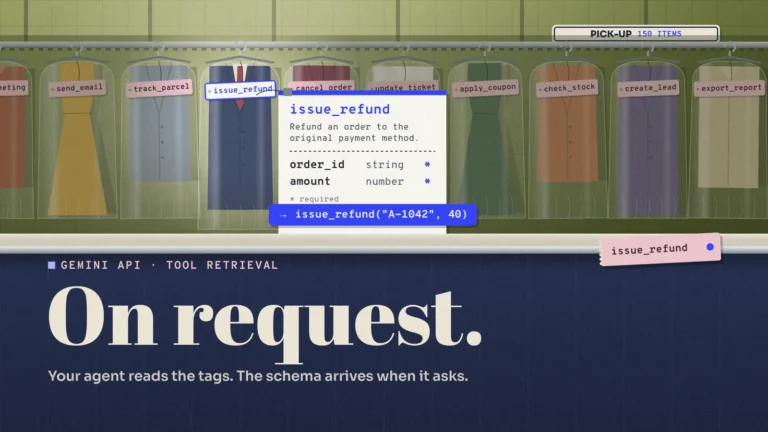
GPT-Live is designed as a front end. It handles turn-taking, tone and interruptions, and delegates reasoning and tool calls to a backend. In responses mode it calls an OpenAI model you configure through the Responses API. In client mode your own application runs whatever model, agent or service you choose and sends the result back. The mode is fixed when the session starts.
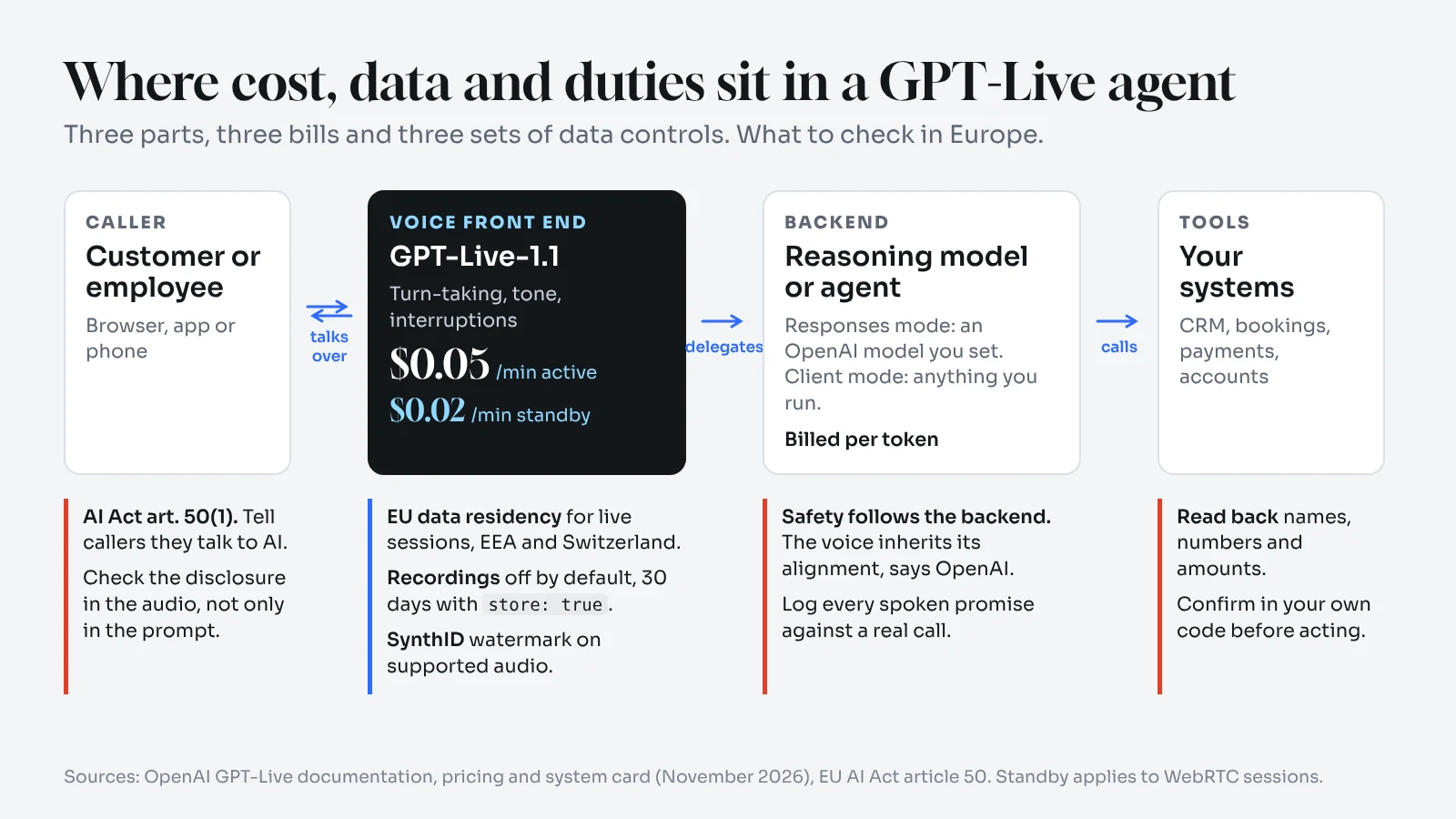
That split has consequences for risk. OpenAI’s GPT-Live-1.1 system card evaluated the API model with delegation switched off, to measure the voice front end on its own. Because that model cannot call tools and forwards prompts to its backend, OpenAI says it inherits the backend’s alignment behaviour. Measured on its own, the API version of 1.1 scored numerically higher than the API version of GPT-Live-1 in all eight synthetic safety categories, with the largest gain on gore, from 0.74 to 0.85. The ChatGPT version of 1.1 was a different story: on difficult synthetic prompts it showed statistically significant regressions in four sensitive categories, which OpenAI says needs more research.
For a governance team, the voice model is rarely the part to assess on its own. The risk sits in the pair: which backend answers, which tools it may call and what it is allowed to do without a human. That is the same question we raised for GPT-6.2 Astra and in our piece on harness engineering. Delegation also has a failure mode of its own. On OpenAI’s forum, developers reported that GPT-Live-1 sometimes acknowledged a request out loud but never delegated it. Whether 1.1 fixes that is not documented, so log every spoken promise against an actual backend call.
Names, numbers and the read-back problem
Better handling of letters and numbers is the improvement contact centres will notice first. It is also where a voice agent fails most expensively. A transposed digit in an IBAN or a misspelled surname sends the right action to the wrong account.
When a developer asked about names and digit sequences with GPT-Live-1, OpenAI support advised three separate checks: the input transcript, the value the agent reads back, and the value it passes to the tool. A correct transcript does not prove the other two. Validate formats and lengths in your own code, require confirmation before acting, and offer keypad entry, written input or a human when a value stays uncertain. That advice still applies to 1.1. Test it with the data your customers really use, such as VAT numbers, postcodes and names with accents.
What European teams should check before going live
Several of these points are new in the second half of 2026, and some do not depend on the model at all.
- Data residency. OpenAI’s data residency guide says GPT-Live supports data residency in the United States and Europe, with storage and processing for live sessions in the EEA and Switzerland. The table names
gpt-live-1, so confirm 1.1 in your own project. The pricing page mentions a 10 per cent uplift on regional processing for models released on or after 5 March 2026 without saying whether it covers GPT-Live. Ask before you budget. - Recordings. Session storage is off by default. With
store: true, OpenAI keeps a recording for 30 days so you can fork the session or download it as stereo audio. Zero data retention turns storage off. Delegated backend models and tools have their own data controls, so map all three. - Disclosure under the AI Act. Since 2 August 2026, article 50 requires that people know they are talking to an AI system unless it is obvious. Under the Act’s definitions, an organisation that puts a voice agent into service under its own name will usually be the provider of that system. OpenAI’s guide warns that a greeting set as a developer message does not guarantee the model will say it, and that you should verify the generated audio for disclosures. Treat the disclosure as a checked step, for example by confirming it in the output transcript within the first seconds or by playing a recorded notice before the call connects.
- Marking synthetic audio. Article 50(2) requires machine-readable marking of AI-generated audio. OpenAI says supported audio from GPT-Live through the API carries a SynthID watermark since 31 July. Ask how it holds up after your telephony codec and recording pipeline.
- Staff using ChatGPT Voice. On 11 December 2026 ChatGPT retires Advanced and Standard voice and moves everyone to Live. Audio clips are stored with the chat for 30 days. In Enterprise and Edu workspaces Live is the default once an owner enables voice, and owners can switch voice off entirely.
Emotion is a separate line. If your agent infers how a caller feels, other AI Act rules apply, which we covered in our article on Block’s Dessa.
A short checklist for a GPT-Live-1.1 pilot
- Run the pilot over WebRTC if you want standby, and measure how quickly a paused session answers.
- Pick the timeout with users, starting at 10 to 15 seconds, and compare interruptions with and without standby.
- Choose and document the backend model, its tools and what it may do without confirmation.
- Log every spoken commitment against a real backend call.
- Read back and confirm names, numbers and amounts in your own code.
- Set up an EU data residency project and confirm that
gpt-live-1.1runs in it. - Decide whether you store recordings, for how long and who can fork them.
- Verify the AI disclosure in the audio, not just in the prompt.
- Test in every language you serve, including those without a dedicated voice.
Frequently asked questions
What is GPT-Live-1.1?
It is OpenAI’s full-duplex voice model for real-time conversations. It succeeds GPT-Live-1, has powered ChatGPT Voice since 15 October 2026 and is available in the API as gpt-live-1.1 since 19 November.
How much does GPT-Live-1.1 cost?
$0.05 per minute for an active session and $0.02 per minute in standby, billed per second. The backend model and tools are billed separately.
What is standby in GPT-Live?
A setting that pauses the model after 5 to 60 seconds of silence while the WebRTC call stays open. The session resumes when someone speaks, and paused time is billed at the lower rate.
Does GPT-Live support EU data residency?
Yes, OpenAI lists storage and processing for live sessions in the EEA and Switzerland. Its table names GPT-Live-1, so check that 1.1 is available in your regional project.
Is GPT-Live-1.1 better than GPT-Live-1?
OpenAI says it transcribes more accurately, holds accents better across languages and handles letters and numbers better, but it has published no figures, and independent tests are not out yet.
Silence is now a design decision
Until now, a voice agent was either on or off, and finance teams counted every minute it was open. Standby adds a third state, and the timeout that controls it is a product decision as much as a cost one. Set it too short and you save a few cents while cutting off the caller who stops to think, which is exactly the behaviour GPT-Live was built to avoid. The organisations that get the most out of 1.1 will be those that tune that pause with real users and treat the backend, not the voice, as the part to audit.