MotionBricks is NVIDIA’s real-time motion model for game characters and humanoid robots. You tell it which poses a character should reach, and it works out how to get there: the steps, the timing, the vault over a bench. The research team reports 2 milliseconds per generation from a single model trained on a dataset of 350,000 motion clips, and the code and trained models are now public. This article explains how it works, how far to trust the numbers, what the licences allow and what European game studios and robotics teams can realistically do with it today.
What MotionBricks is
MotionBricks comes from the GEAR lab at NVIDIA Research, with co-authors from ETH Zürich, Simon Fraser University and the University of Texas at Austin. The paper was published in ACM Transactions on Graphics and presented at SIGGRAPH 2026 in July.
It targets one of the most expensive parts of interactive animation. Characters in games usually run on an animation graph: a state machine of pre-recorded clips with hand-authored transitions between walking, running, crouching, vaulting and sitting. The paper cites the animation state machine used in Assassin’s Creed, which may require more than 15,000 animations, 5,000 states and graphs nested up to 12 levels deep. Every new behaviour makes the graph harder to maintain, which is why high-quality runtime animation has mostly stayed with large studios.
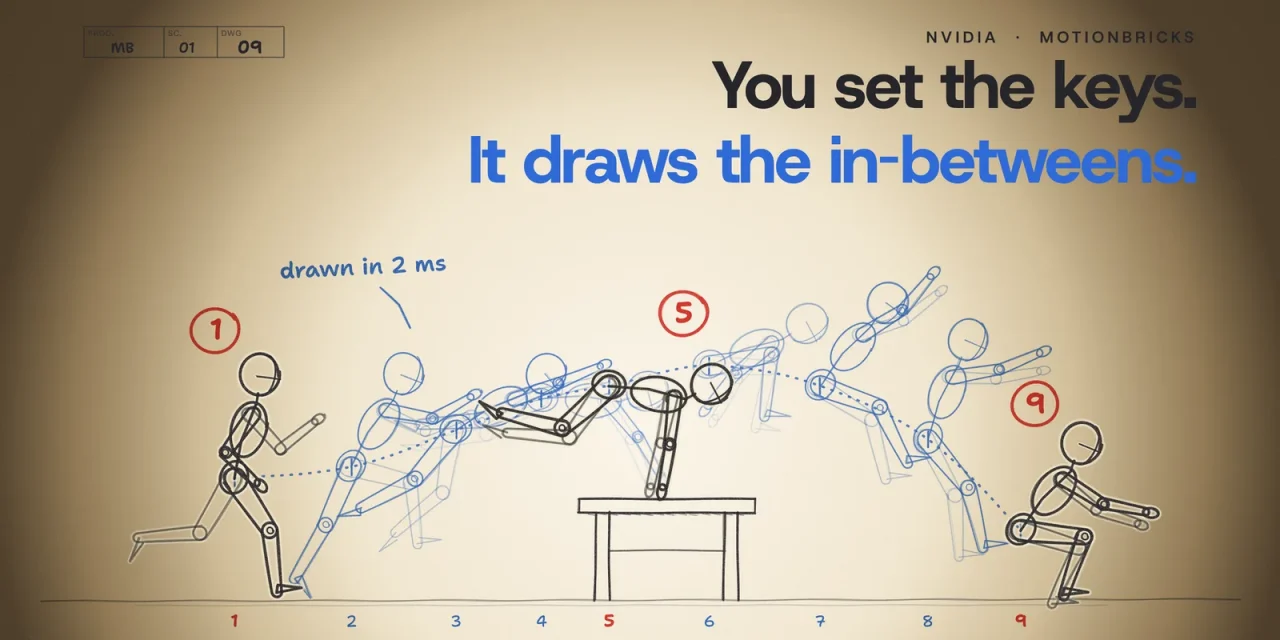
MotionBricks replaces those hand-made transitions with one neural network. The game or the robot decides where a character should go and in which pose it should arrive. The model generates the motion in between. Behaviours such as walking, vaulting or sitting become reusable building blocks that snap together without retraining.
How MotionBricks works

The core idea is in-betweening, the old animation term for drawing the frames between key poses. At 30 frames per second, each generation receives two sets of poses:
- Context: the character’s four most recent poses, which carry its current posture and speed.
- Targets: one to four poses the character must reach. One pose sets where it stops. More poses also set the speed and momentum at that point, so the character can move through the target instead of halting.

The model chooses how long the transition takes, typically 0.6 to 1.9 seconds of motion per generation. Three trained modules share the work. A root module predicts the duration and the path of the pelvis. A pose module, the largest part, predicts discrete motion tokens along that path, much as a language model predicts word pieces. A decoder turns those tokens into continuous motion, including foot contacts, that lands on the targets.
Longer motion comes from chaining. The runtime plays the result, records what it played and uses the last four poses as the context for the next generation. When the player changes direction, the system simply replans.
Smart primitives, the actual bricks

On top of the model sit what NVIDIA calls smart primitives. Smart locomotion turns gamepad or keyboard commands (speed, heading and style) into target poses, so walking, jogging, stealth, strafing, crouching or a zombie gait all come from the same model with smooth transitions between styles. Smart objects describe an interaction as a few key poses around an object, such as hands on the edge of a bench and the landing behind it. The model fills in the approach, the contact and the follow-through. Because the poses rotate with the object, the same bench works from any angle.
According to the paper, a non-expert can author such a primitive in Unreal Engine 5 in under ten minutes. The team used them to build an uncut 2 minute 40 second demo in Unreal Engine 5 in which a character walks, climbs, falls, picks up a sword and sits down, with no hand-authored transitions.
From game characters to a Unitree G1
NVIDIA also trained a version for the Unitree G1 humanoid, on the same motion data retargeted to the robot’s skeleton. On the robot’s Jetson Orin module a generation takes 5 milliseconds, with replanning ten times per second or whenever the command changes. MotionBricks now powers the motion-generation layer of GR00T Whole-Body Control, NVIDIA’s open framework for humanoids.
The output is kinematic: a sequence of desired poses, not motor commands. A separate tracking controller keeps the robot balanced while it follows the motion. That split matters for anyone thinking about deployment, and we return to it below. For a wider view of where humanoids stand, see our analysis of physical AI in the next decade.
What the numbers say
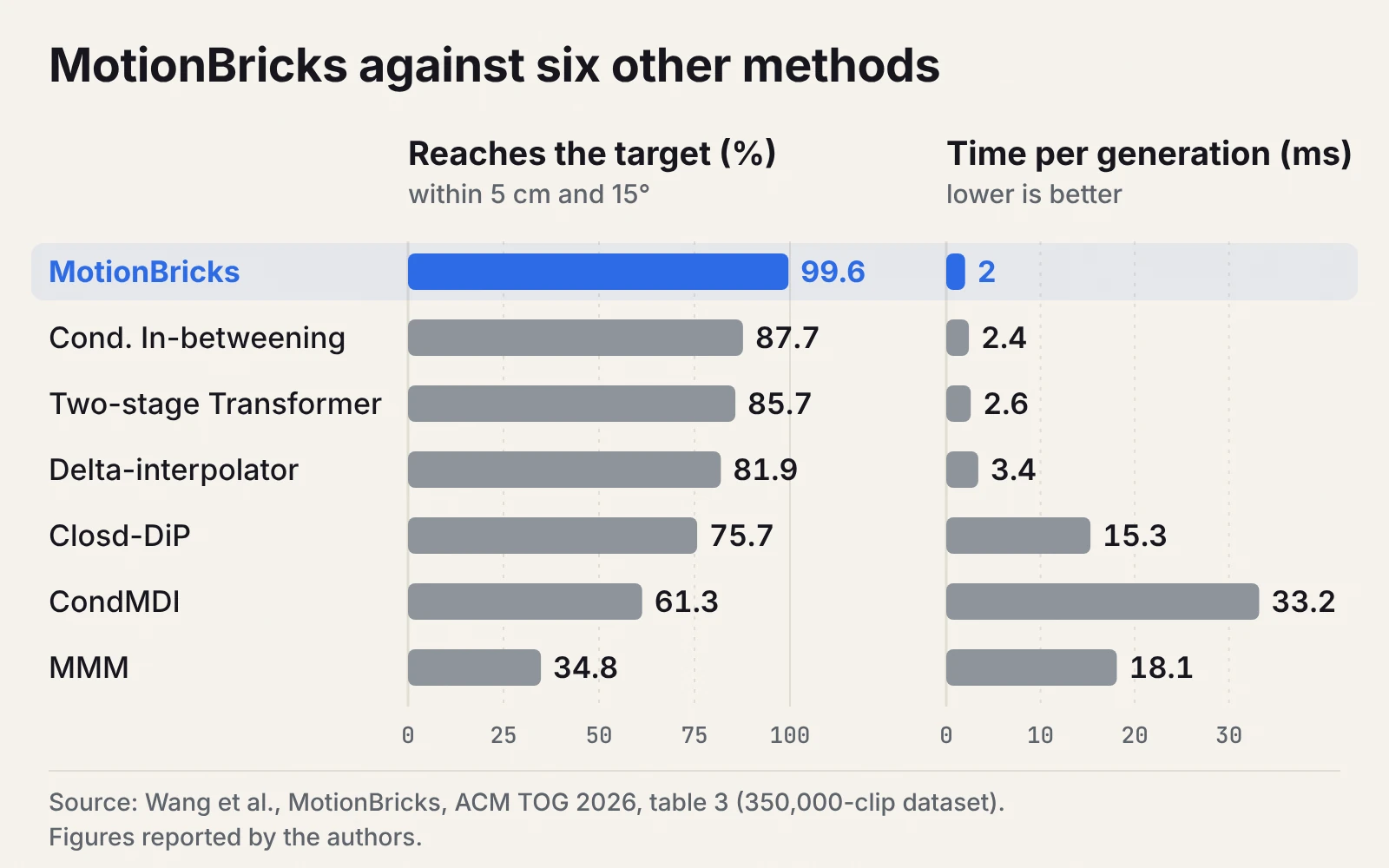
The team compared MotionBricks with six in-betweening methods on a test set of about 35,000 clips:
- Speed: 2 ms per generation and a throughput of 15,000 frames per second on a desktop with an RTX 5090.
- Precision: the motion reaches the target within 5 cm and 15 degrees in 99.6% of cases. The best competing method reached 87.7%, diffusion models at most 78.2%.
- Human judgement: in a study with 40 participants from animation and robotics, MotionBricks was picked as best in 86.5% of trials, each against two other methods.
- Physical plausibility: the lowest foot sliding of all methods tested on the main dataset.
Read them with two caveats. The main comparison uses a proprietary dataset from Bones Studio (Bones RigPlay 1) of about 700 hours of motion capture, with 9,300 distinct skills from 163 performers. On the smaller public datasets HumanML3D and LaFAN1 the lead is smaller, other methods match it or do marginally better on diversity, and on the robot benchmark LaFAN1-G1 MotionBricks reaches the target in only 61.1% of cases. And the speed comes from a top-end GPU, while the released demos were tested on an RTX 4090.
What is in the release, and under which licence
The GitHub repository and the Hugging Face page provide trained models for the SOMA human skeleton and the Unitree G1 (ONNX files plus checkpoints of roughly 200 million parameters), a Python runtime built on NVIDIA Warp, Newton and TensorRT, two demos (the Inbetweener and the Scene Preview), and two editors to author your own primitives and scenes. It needs an NVIDIA GPU. Not included: the training pipeline, the full training data and the Unreal Engine plugin used in the paper’s demo. An earlier preview inside GR00T Whole-Body Control does ship a synthetic training loop with instructions for the open BONES-SEED dataset from Bones Studio.
Besides CC BY 4.0 for documentation and media, three licences matter, and legal teams will want to see the difference:
| Component | Licence | In practice |
|---|---|---|
| Code and examples | Apache 2.0 | free to use and modify, including commercially |
| Trained models | NVIDIA Open Model Agreement | commercial use and redistribution of modified models allowed, with the licence and attribution notices kept; the licence ends if you sue claiming the model or its output infringes a patent or copyright |
| Bundled sample motions | NVIDIA Sample Data Evaluation License | evaluation and testing only, not for a shipped product |
The practical consequence: you can build on the models, but the motion clips you use to define key poses and styles in production have to come from your own capture or from data you have licensed.
What it means for European game studios
For a mid-sized studio that cannot staff a large animation team for every new behaviour, the attraction of MotionBricks is not raw speed but authoring cost: fewer transition clips to capture, clean up and wire into a graph. The established alternative is motion matching, which now ships in Unreal Engine 5 and comes with Epic’s free sample of more than 500 animations. Motion matching searches a database for the best existing fragment. MotionBricks generates new motion, so it can produce transitions that were never captured, but it also inherits the gaps in its training data.
We found no shipped game that uses MotionBricks yet, and the released runtime is a Python reference rather than an engine plugin. That makes it a good candidate for prototyping and for tools such as previsualisation, crowd or NPC behaviour, rather than a drop-in replacement for a hero character’s animation.
What it means for robotics teams in Europe
For robotics, MotionBricks is a motion planner, not a controller. The model cards say plainly that the generated motion “is not validated for physical robot control”, and that a downstream controller has to track it under robot dynamics and physical limits. Anyone putting a humanoid near people in Europe should plan for the new Machinery Regulation, which applies from 20 January 2027 and puts machinery with self-evolving, machine-learning safety functions under stricter conformity assessment, and for the emerging humanoid safety standard ISO 25785-1. A generative motion layer will need limits, monitoring and tests that sit outside the model.
The G1 model is directly relevant to labs that already work with that robot, as in the table tennis doubles research we covered. For other robots, you would need to retarget motion data to your own embodiment and train, and the paper is candid that high-quality retargeting for the G1 took months.
A 30-day way to test it
| Week | Game studio | Robotics team |
|---|---|---|
| 1 | Run the Inbetweener and Scene Preview, follow the guided tutorial | Run the G1 demos in simulation, read the G1 model card |
| 2 | Rebuild one existing interaction (a vault, a sit) as a smart primitive with your own clips | Generate reference motion for two tasks and track it in simulation with your controller |
| 3 | Compare authoring time and look with your current graph or motion matching setup | Measure tracking error, joint limits and failure cases; log every unsafe pose |
| 4 | Decide on an engine integration path via ONNX and check the licences with legal | Write down the safety layer you would need before any hardware test |
Where MotionBricks still falls short
- Rare motions are thin. The paper mentions a single clip for vaulting a 0.5 m obstacle.
- No physics. As a kinematic planner it can produce self-collisions or motions a robot cannot safely execute, such as risky flips.
- No visual planning. In a game the system knows exactly where the bench is. A real robot has to infer that from noisy sensors, which disables smart objects outside simulation for now.
- Retargeting stays hard. Real-time retargeting is fast but lower quality; offline retargeting is accurate but slow.
The real shift is the interface
The most interesting idea in MotionBricks is not the 2 milliseconds. It is that one interface, key poses placed around a goal, serves both a game character vaulting a bench and a humanoid robot walking, crouching or sitting. If that interface holds up in production, the skill that matters moves from wiring transition graphs to choosing good key poses and good data. For European teams, that favours whoever owns well-licensed motion data and the safety engineering around it.
Frequently asked questions about NVIDIA MotionBricks
Is MotionBricks free for commercial use?
The code is Apache 2.0 and the models fall under the NVIDIA Open Model Agreement, which allows commercial use. The bundled sample motions are for evaluation only.
Does MotionBricks work in Unreal Engine or Unity?
Not out of the box. NVIDIA built an Unreal Engine 5 plugin for the paper but has not released it. The release provides ONNX models and a Python runtime that you can integrate yourself.
What hardware do I need?
An NVIDIA GPU. The demos were tested on an RTX 4090 under Windows and Linux; the paper’s 2 ms figure was measured on an RTX 5090.
Can I control MotionBricks with text prompts?
No. It is driven by poses, speed and heading. For text-to-motion, NVIDIA has a separate project, Kimodo.
Can I use it on a robot other than the Unitree G1?
Only SOMA and G1 models are available. Another robot needs retargeted data, your own training, a separate controller and safety validation.