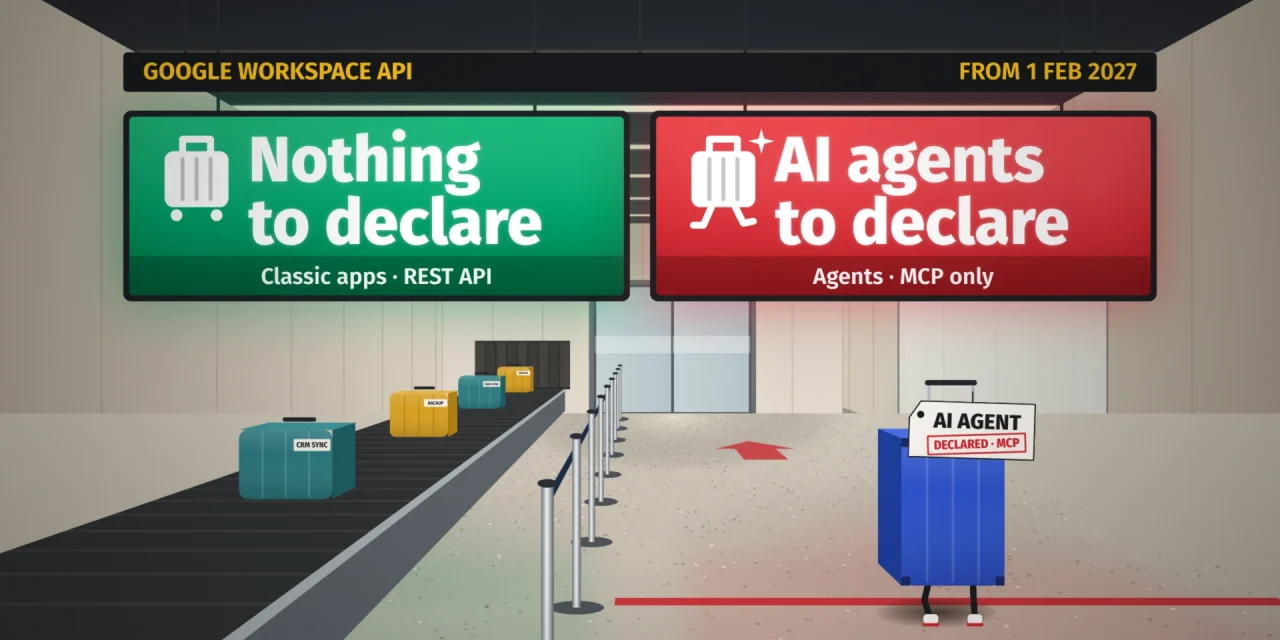
If your company already connects to Gmail, Drive or Calendar through the Google Workspace API, one question now decides what you pay and what you may build: is the integration an AI agent? On 24 November 2026 Google made its Workspace MCP servers and command line tool generally available and put the APIs on two usage tiers. Classic integrations mostly carry on for free. AI agents must switch to MCP by 1 February 2027, projects with raised quotas must act before 1 April 2027, and a new addendum caps how long you may keep embeddings and other data derived from Workspace at 30 days.
What Google announced on 24 November
Four things arrived together in the Workspace Updates announcement.
- Workspace MCP servers, now generally available. Google hosts MCP servers for Gmail, Drive, Docs, Sheets, Slides, Calendar, Chat and Tasks, with Keep to follow. The tools return summaries instead of raw data, which Google says cuts tokens and latency, and they come with confirmations, audit logging and admin controls built in.
- The Workspace CLI. gwscli is meant for agents that work in a terminal, a VM or one of the sandboxes that coding agents now run in, such as Claude Code, Codex and Antigravity. It ships with agent skills, discovers its commands at runtime and signs in per scope or even per action.
- Two usage tiers, Standard and Scaled. They start with the Gmail, Drive and Calendar APIs and their MCP servers. Other access routes follow in the coming months.
- The Workspace AI Tools Addendum, which takes effect on 1 February 2027, plus new admin controls for agents.
The rollout to Rapid and Scheduled Release domains takes up to two weeks, and the changes apply to all Workspace customers and developers.
The plan itself is not new. Google first set it out on 1 May 2026, when the MCP server entered public preview and new projects got new baseline quotas. Projects that were active between November 2025 and April 2026 kept their older limits. That grace period ends on 1 April 2027.
Two tiers, and two very different price lists
Standard is free and needs no billing account. Every Google Cloud project gets the published REST rate limits and, for the generally available MCP servers, 5,000 requests per day per product, on top of per-minute limits. Go over and requests are throttled until the window resets. You cannot ask for more on Standard. Google says over 99% of active developers fit inside it.
Scaled is pay as you go and applies to the whole Cloud project, not to one API. You link a billing account, and Google prices every operation in one of four buckets.
| Bucket | Price per 1,000 requests | Examples of MCP tools | Free REST volume per day |
|---|---|---|---|
| Light | $0.10 | get_file_metadata, list_labels | Gmail 70 million, Drive 20 million |
| Medium | $0.20 | create_draft, copy_file | Gmail 10 million, Drive 7 million |
| Plus | $0.25 | search_files, list_recent_files, every Calendar call | Drive 4 million, Calendar 1 million |
| Premium | $0.50 | search_threads, get_thread, read_file_content | Gmail 1 million, Drive 1 million |
The last column is where the two worlds part. On Scaled, REST traffic only costs money above those daily volumes, which count per billing account and reset at midnight Pacific Time, 9:00 in Brussels for most of the year. MCP traffic on Scaled has no free volume at all. From 1 April 2027 every successful MCP request is billed, and signing up does not raise your quota by itself, so you still file a quota increase request. The details are on Google’s pricing page, last updated on 24 November.
There is one exception for internal tools. A Workspace super admin can mark a project as internal, which keeps higher REST quotas inside the Workspace subscription. The project may only serve users of the same organisation, may not share API or MCP access directly with third parties and may not contain an OAuth client for an external audience. The exception covers REST only. An internal AI agent on MCP that outgrows 5,000 requests a day has one way up, and that is Scaled.
Is your integration an AI agent?
Answer this first, because the Addendum turns it into a contract term. It defines AI agents as goal-oriented AI systems or workflows that act on a user’s behalf, supervised or autonomous. Any tool that is an AI agent, or is driven by one, by an AI harness or by an AI model, must use Google’s MCP servers. The Addendum also forbids disguising how a tool is classified. If you are unsure what counts as a harness, our explainer on what an AI harness is walks through the parts.
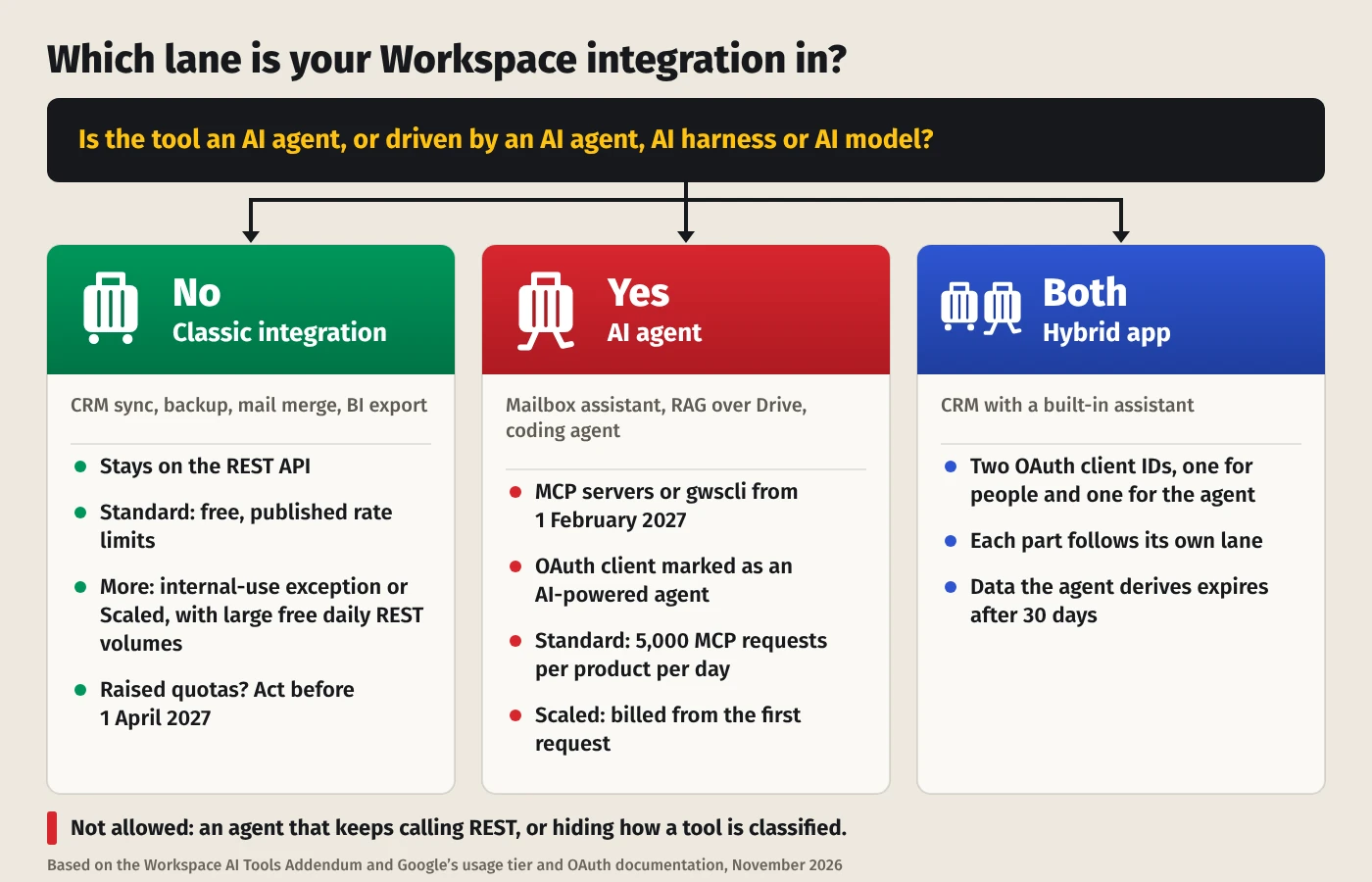
Most companies on the API will find their integrations in one of three lanes.
- Classic integrations. A CRM that syncs contacts and mail, a backup tool, a mail merge, an export to your BI stack. Your code decides what to call, not a model. These stay on REST. Check the new usage dashboard and act before 1 April 2027 if you rely on raised limits.
- AI features and agents. An assistant that searches mailboxes, a meeting summariser that reads Calendar and Docs, a RAG search over Drive, a coding agent that writes drafts. A model chooses the calls. These move to MCP before 1 February 2027, with an OAuth client on which “Use this client for an AI-powered agent” is ticked.
- Hybrid apps. A product with both, such as a CRM with a built-in assistant. Google requires separate client IDs, one for the features people drive and one for the agent.
Keeping an agent on REST is not a quiet loophole. From 1 February 2027 agents that call the REST APIs directly are held to Standard quotas whatever tier you pay for, and the Addendum lets Google restrict or remove access as soon as it believes a tool breaks the rules.
Two technical traps catch teams that think they are done. Service accounts with domain-wide delegation cannot carry the agent setting, so their access runs through the admin’s delegation settings and is easy to overlook. And the default OAuth client of Apps Script cannot be marked as an agent, so an Apps Script agent needs a client of its own. The MCP servers answer any non-agent client with an invalid token error.
Where the free tier ends for an in-house assistant
Google publishes prices, not typical workloads, so we worked one out. Take an assistant that, per user and per working day, runs 6 Gmail searches, opens 15 threads, writes 3 drafts, runs 6 Drive searches, reads 4 files and makes 5 Calendar calls. That is 24 Gmail, 10 Drive and 5 Calendar requests per user.
Gmail hits the Standard cap first. At 5,000 requests a day, this assistant fits about 208 users. A company of 150 people sends 3,600 Gmail requests a day and pays nothing.
One user more and the bill jumps. Scaled applies to the whole project and MCP is billed from the first request, so the traffic of the first 208 users now costs money too. At the bucket prices above, each user costs about $0.016 a day, or $0.33 a month over 21 working days. That puts 209 users at roughly $70 a month, 300 users at $100 and 1,000 users at $333.
Three caveats. Google warns that some composite MCP tools count as several requests, without saying which ones, so real numbers can be higher. Volume discounts only start above $20,000 of monthly spend. And the same traffic through REST on Scaled would sit comfortably inside the free daily volumes, which is exactly the route the Addendum closes for agents. For your own traffic, the cost estimator in the new usage dashboard in the Cloud console is the number to trust.
For a software vendor that serves hundreds of customers from one Cloud project, 5,000 MCP requests a day are gone before lunch. If you buy an AI tool that reads your Workspace, the bill lands on the vendor’s project, not yours. Ask how they plan to price it.
The 30-day rule hits RAG and memory features hardest
The part of the Addendum with the most design impact has nothing to do with price. It introduces “Google Technical Information”, data derived from Workspace interactions such as embeddings, memory indexes, user profiles and organisational graphs. You may not keep it for more than 30 days, and you may only process it for active tasks a user authorised. That is the only fixed retention period in the Addendum.
That rules out a common architecture: index every mailbox and Drive folder once, store the vectors and query them for months. A vector store over Workspace now needs a job that rebuilds or expires the index within 30 days, and a deletion path that removes raw and derived data when a user disconnects or revokes access.
The Addendum also bans using Workspace data or derived data to train, fine-tune, evaluate or distil models, to build a service that resembles a Workspace service, and to scrape or systematically probe the APIs and MCP servers beyond what a task needs. For European organisations much of this lines up with the GDPR principles of purpose and storage limitation. The difference is the sanction, because a breach now also costs you your Workspace access. If your AI plans rest on owning your context, as we argued in models are rented, context is owned, keep that context in your own systems and treat Workspace as a source you query, not a store you copy.
What Workspace admins get
The controls sit in the Admin console under Security > API Controls, next to the existing settings for which apps may access Workspace data.
- External agents must identify themselves through their OAuth client and connect through the Workspace MCP servers, so admins can see and manage them as agents.
- Admins can require a user confirmation for sensitive actions, such as reading external files or sharing data. Routine actions, such as creating a draft, go through without a prompt.
- Existing user-level DLP rules apply to agents, and the audit logs record agent actions and confirmations.
- Saved tool approvals expire after 90 days. Users cannot view or revoke them themselves.
Google’s own setup guide warns about indirect prompt injection, such as an email that contains instructions for the agent. Confirmations for sensitive actions help, but they are not a filter. Decide now which agent actions in your domain need a human, and write that into your agent policy.
A checklist before 1 February and 1 April
- List every Cloud project that calls Gmail, Drive or Calendar, including service accounts with domain-wide delegation and Apps Script projects.
- Mark each integration as classic, agent or hybrid, and write down why. That note is your answer if the classification is ever questioned.
- Give every agent its own OAuth client with the agent setting, and split hybrid apps into two clients.
- Move agents from REST calls to the MCP servers or gwscli before 1 February 2027, and test the confirmation prompts your users will see.
- Open the usage dashboard in the Cloud console, compare 30 days of traffic with the Standard limits and run the cost estimator.
- For projects above Standard, choose the internal-use exception for REST or the Scaled tier, then file the quota increase request, all before 1 April 2027. Set billing alerts on Scaled projects from day one.
- Add a 30-day expiry and a cleanup on disconnect to every index, cache or memory built from Workspace data.
- Ask every AI vendor that touches your Workspace three questions: MCP by 1 February, a separate agent client or not, and how they meet the 30-day rule.
Frequently asked questions
Do I pay anything if my app only syncs contacts and mail through the Gmail API?
Usually not. Standard costs nothing and Google says over 99% of developers stay there. Check the usage dashboard. If your project had raised quotas, opt in to Scaled or to the internal-use exception before 1 April 2027, or it falls back to Standard limits.
Does the Workspace CLI count as MCP access?
Google presents the CLI and the MCP servers as the two routes for agents. The CLI needs the MCP services enabled in your project and an OAuth client marked as an agent, and its requests count toward the tier and quotas of that project.
Can an internal AI agent use the internal-use exception?
No. The exception only raises REST quotas. An agent has to use MCP, which gives 5,000 requests per product per day on Standard and needs Scaled beyond that.
What happens if I do nothing?
Classic REST integrations within Standard keep working. Projects with raised quotas drop to Standard limits on 1 April 2027 and may be throttled. Agents still on REST are held to Standard quotas from 1 February 2027 and break the Addendum.
Can I use the Workspace MCP servers with Claude or other assistants?
Yes. Google’s setup guide lists Claude as a custom connector on Pro, Max, Team and Enterprise plans, Google Antigravity, and any client that supports remote MCP over Streamable HTTP with OAuth.
The line between app and agent is now yours to draw
Until this week, an OAuth token was an OAuth token. From February, Google wants to know who is calling, and it prices and polices the answer. For most companies the bill will stay at zero. The real work is architectural: separate clients, MCP for anything a model drives and derived data that expires. Teams that draw that line themselves in the next ten weeks will barely notice April. Teams that leave it to enforcement will learn which lane they were in when the throttling starts.