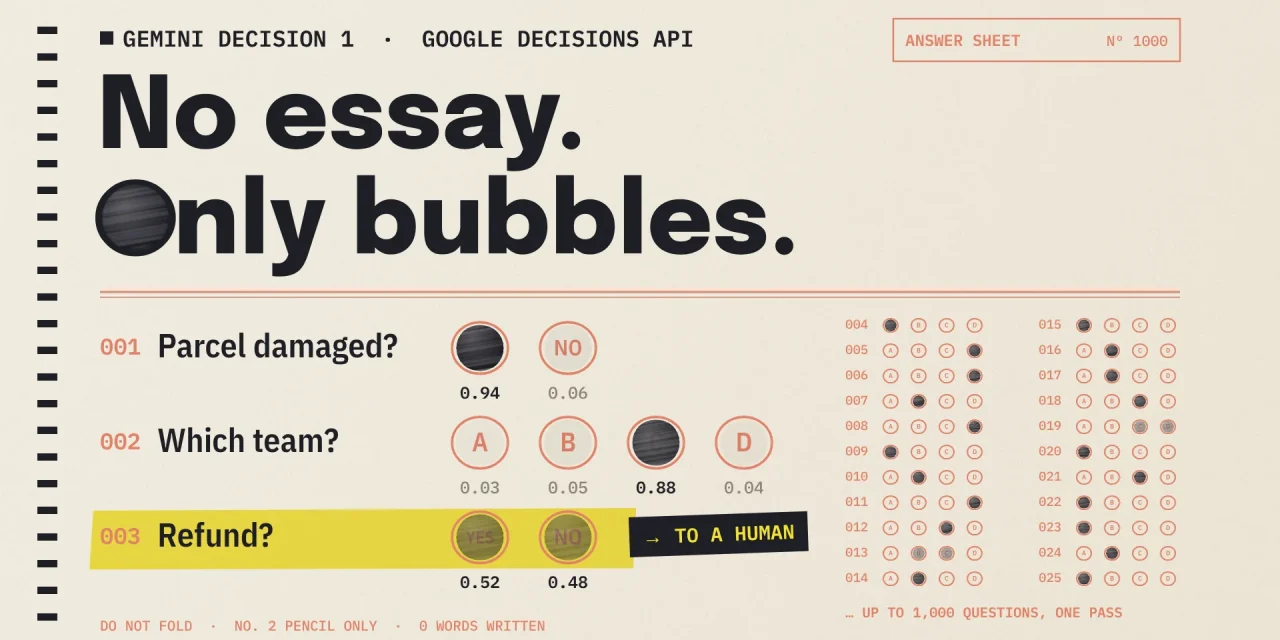
Google launched the Gemini Decisions API on 11 November 2026, powered by a new model called Gemini Decision 1. The model does not write answers. You give it one input and up to 1,000 questions with fixed answer options, and it returns a probability and a confidence score for each question. Google says this takes 150 to 250 milliseconds and costs $0.10 per million input tokens, with output free. It is built for the many small decisions inside software and AI agents: which team, which model, may this action proceed, is this parcel damaged.
For European organisations the more important change is what comes back. A probability with a threshold can be logged, explained and tuned, which a generated yes cannot. This article covers how the API works, what it costs in a worked example, how it compares with OpenAI, Jev and Strands Decider, the pitfalls in Google’s documentation, and the controls you need before it decides anything that matters.
What the Gemini Decisions API does
A normal language model generates its answer token by token. Gemini Decision 1 reads the input once and scores every allowed answer option in a single forward pass. That is why the number of questions barely affects speed: according to Google, latency stays nearly flat from 1 to 100 questions per request, measured on inputs up to 16,000 tokens.
The input can mix text, images, audio, video and PDF, up to 256,000 tokens. Google’s own examples are a call recording with account metadata, and a scanned claim form with photos of the damage. Each question is one of three types:
- Yes or no, called
noulin the API. It returns the probability that a condition holds, for example whether an invoice carries a VAT number. - Choice,
choice. The model picks from 2 to 255 options and returns a probability per option, summing to 1. - Score,
score. The model grades the input on an ordered rubric, such as urgency from 0 to 4, and returns a weighted score and a probability per level.
Every answer carries a confidence value between 0 and 1. It exists to route work: clear cases are handled automatically, ambiguous ones go to a person or to a larger model.
Where Google already uses it
The most telling examples are Google’s own. Gemini Notebook uses the model as a real-time router that sends each query to the right model tier and thinking level, which Google says cuts latency for everyday queries by up to 40 percent. Google Search uses it as a safety layer for MCP tools, detecting adversarial behaviour and content before a tool runs. Stitch and a Google Labs app use it for fast interface edits and for picking an emoji reaction from more than 200 options.
In a typical European business, the candidates are closer to daily operations:
- routing incoming emails and tickets to the right team, with an urgency score;
- checking a customer photo against an order note to see whether the product looks damaged;
- qualifying web leads and suggesting the matching package;
- a fixed check before an AI agent calls a risky tool, as part of the harness around the agent.
What it does not do is write text, reason step by step or call functions. It only chooses between options you define in advance.
What it costs, in a worked example
You pay $0.10 per million input tokens and nothing for output. The shared input is billed once per request, however many questions you attach, and each question adds only its own instruction and option tokens. There is no separate charge for audio transcription or OCR.
A worked example with our own assumptions: a service desk receives 10,000 emails averaging 1,500 tokens, and asks 12 questions of about 60 tokens each, covering team, language, urgency, sentiment and churn risk. That is 2,220 tokens per email and 22.2 million tokens in total, or $2.22.
Ask the same 12 questions one by one to Gemini 3.5 Flash-Lite, each time with the email and a short answer, and Google’s price list puts the bill at about $62. Bundle all questions in a single Flash-Lite call with a JSON answer and you land near $10.40. Most of the difference is output tokens, which Flash-Lite charges at $2.50 per million. Google itself claims Decision 1 is nearly five times cheaper than Flash-Lite on its own benchmark suite.
Two things push real costs above this example. Images, audio and video consume many tokens, although you can lower image and video resolution. And there is no context caching and no Batch API, so sending the same long input twice means paying twice.
How it compares with OpenAI, Jev and Strands Decider
Decision models became a category in a matter of weeks. TypeSafe launched Jev on 15 September and raised $870 million in October. AWS released Strands Decider 2B as open source, the multilingual Laya appeared with open weights, and OpenAI made its Decisions API generally available on 22 October.
| Offering | Price per 1M input tokens | Questions per request | Input | Where it runs |
|---|---|---|---|---|
| Gemini Decision 1 | $0.10, output free | up to 1,000 | text, image, audio, video, PDF up to 262,144 tokens | Gemini API and AI Studio, Google Cloud later |
| OpenAI Decisions API | $0.10, discount on cached input | up to 400 | text, JSON and images | OpenAI API, on GPT-6 Luna |
| Jev by TypeSafe | $0.042, output free | not published | text up to 32,000 tokens | TypeSafe, on Cloudflare |
| Strands Decider 2B by AWS | your own compute | depends on your setup | text | open source under Apache 2.0, self-hosted |
Gemini Decision 1 stands out for input size and for audio and video. Jev is cheapest per token but text only. OpenAI offers caching, which matters when the same long context recurs. Teams that cannot send data to an external API look at self-hosted options. Google claims the lowest calibration error among the models it tested, but only shows the figures in charts, and no independent tests exist yet.
Because the request shape is so similar across vendors, a thin abstraction layer and your own test set keep you free to switch. The decision logic you write, and the labelled cases you calibrate on, are the assets that stay yours, a point we made more broadly in models are rented, context is owned.
Five pitfalls from the documentation
The Decisions API documentation is more candid than the launch post. These five points decide whether your application is reliable.
- A choice question always chooses. Probabilities in a
choiceanswer always sum to 1, even when no option fits. An off-topic email still gets assigned a team. Add anotheroption and watch the confidence value. - Yes or no never exceeds 0.99. A
noulanswer lies between 0.01 and 0.99. A rule that only acts above 0.99 never acts. - The input can argue its own case. Google writes that user-supplied text can argue for its own classification. A customer who writes that this is an urgent refund can move the score. Keep a person or a second check in front of anything that moves money or affects rights.
- The model never sees your keys. It reads only a question’s
instructionsand the option descriptions, not the key you gave the question, and option keys are sorted alphabetically. Write each question out in full. - A score is an average. The
scorevalue is a probability-weighted average of the levels. Use evenly spaced levels, and take the most probable level when you need a single grade.
The controls European firms need
The Gemini API and Google AI Studio are available in all EU member states, so you can test today. Four controls belong in place before production.
Keep real data out of the free tier. Google may use content from the free tier to improve its products, but not content from the paid tier. Prototype with synthetic or anonymised cases.
Know where it runs. The model is currently only available through the Gemini Developer API, as v1beta. If you need Vertex AI, with its enterprise terms and regional processing options, you have to wait for the Google Cloud version, which Google calls coming soon without a date. Decide now whether a pilot on the Developer API fits your data protection assessment.
Treat thresholds as policy. The threshold above which a decision runs automatically is a business rule, not a technical default. Set it per question on your own labelled cases, as the documentation recommends, record who approved it, and log every question, probability, confidence and threshold. That log is what makes a decision auditable later.
Check the AI Act classification. Ranking job applicants or assessing the creditworthiness of individuals is high-risk under Annex III of the AI Act, with most obligations applying from December 2027. A confidence threshold with a human review queue is a sound start for human oversight, but not the whole of it. Analyst Lian Jye Su of Omdia told InfoWorld that a confidence score alone does not prove a decision is trustworthy, especially when data drifts or inputs are manipulated, and that Google will have to meet data retention and sovereignty requirements.
Google does not say how well Gemini Decision 1 handles French, German, Dutch or other European languages. Measure that on your own traffic before you rely on it.
A one-afternoon pilot
- Create an API key in Google AI Studio and try the Decisions API playground with a few of your own examples.
- Collect 100 to 200 real cases, anonymised, and record the correct answer for each. Include every language your customers use.
- Write each question in full, with short and clearly distinct options and always an other option.
- Send all questions per case in one request and store probabilities and confidence values.
- Pick a threshold per question based on the error rate you still see above it.
- Route everything below the threshold to a person, and measure again after a month.
Frequently asked questions
Is Gemini Decision 1 free?
There is a no-cost tier in Google AI Studio for prototyping. In production you pay $0.10 per million input tokens and nothing for output.
Can Gemini Decision 1 write text?
No. It only returns probabilities and scores for options you define. For an explanation or a reply to a customer you need a generative model.
How is this different from structured output?
With structured output a language model writes a JSON answer token by token, and you pay for those output tokens. A decision model scores the options in one pass and gives a probability per option, which is faster, cheaper and makes a threshold possible.
Is it available on Vertex AI?
Not yet. Google says support in Google Cloud is coming soon, without a date.
Decisions you can audit
The low price grabs attention, but the bigger shift is that an AI decision becomes a number you can check. That only holds if you calibrate the thresholds on your own cases and keep the log. No vendor can do that part for you, and it is also the part that will survive the next model switch.