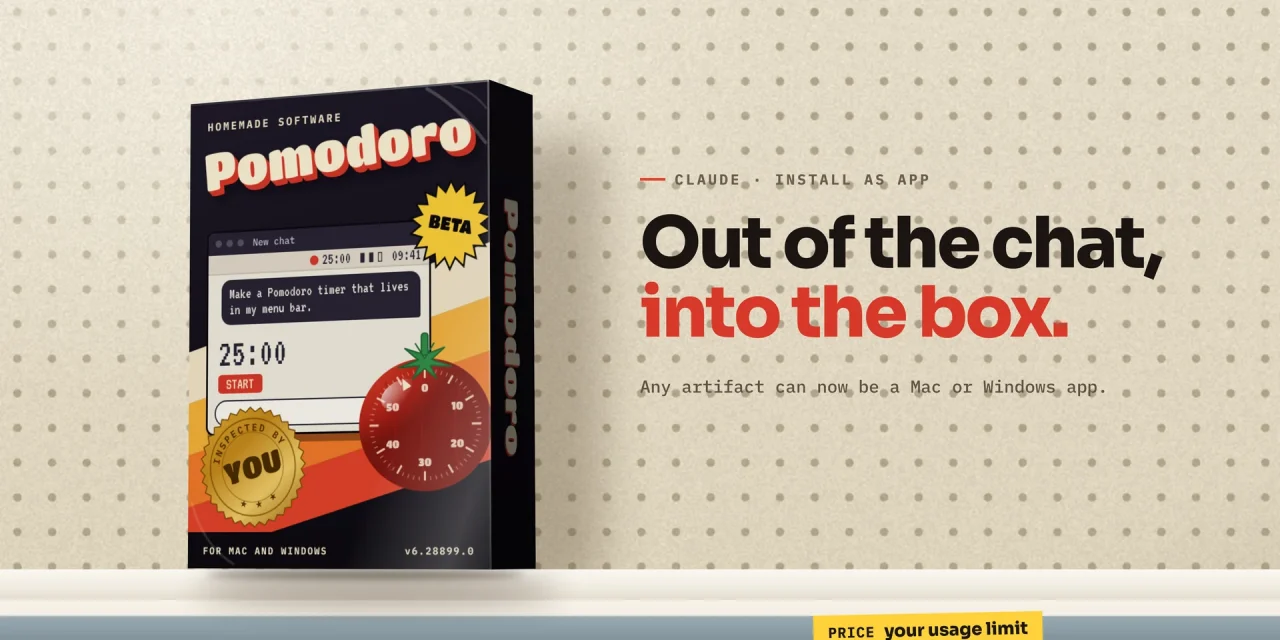
Since 24 November 2026, anything Claude builds as an artifact can be installed as a desktop app on Mac and Windows. It gets its own icon and window, uses Claude and the employee’s connectors, and can ask for notifications, global shortcuts or full access to the computer. Nobody has to package or sign it, and Anthropic does not review it. For an individual that is a convenience. For an IT team it is a new software channel that bypasses the usual catalogue, and the defaults differ sharply between Claude Team and Claude Enterprise.
This article explains what Install as app does, how its permission model works, which controls admins have, and what European organisations should settle before staff start installing.
What Install as app does
An artifact is anything Claude makes beside a conversation, from a document to a small interactive tool. With Install as app, Claude Desktop runs that same artifact in a window of its own, with an icon in the Dock, the Start menu and Spotlight. According to Anthropic, the feature is in beta on every plan, from Free to Enterprise, and requires Claude for Mac or Windows version 6.28899.0 or later. The installed app can use Claude and the user’s connectors the same way the artifact does, and it updates automatically whenever someone edits the underlying artifact.
Anthropic’s own examples show how far that reaches: Linnet, a layered image editor; Phosphor, a file manager; Sift, which sets folder rules and uses Claude to keep files organised; Tern, a terminal with Claude alongside; and Vitals, a menu bar and tray monitor for the computer’s performance. None of them needed a developer account, a build pipeline or an API key. Building the app and every Claude request it makes count towards the user’s plan limits.
Some things stay out of scope. Template artifacts such as Claude Docs, Slides and Sheets cannot be installed, nor can legacy chat artifacts or Cowork live artifacts. The feature does not exist on Linux, the web or mobile, and an app only opens while the user is online and signed in to Claude Desktop.
How the permission model works
An installed app starts with nothing beyond what a web page can do. Every extra capability has to be requested, and the user answers Allow or Don’t allow. Anthropic’s help page groups the requests in three tiers.
- Default. Browser-level behaviour only.
- App permissions. Notifications while other apps are in use, global keyboard shortcuts, floating over other windows while reading the cursor position, and a menu bar item on macOS or a system tray icon on Windows. Apps with a tray or menu bar item keep running after their window closes.
- Full access to this computer. Running programs and reading, changing or deleting files without asking each time. It also covers the app permissions above.
Three rules shape the risk. First, consent is versioned: an Allow covers one version of the app, and Claude asks again after any update, including the user’s own edits. Second, full access is restricted to apps the user wrote. On Team and Enterprise that extends to colleagues in the same organisation, but on Free, Pro, Max and Ultra “outside your organization” means anyone other than you, so a stranger’s shared app cannot get it. Requests from apps whose author Claude cannot identify carry a warning. Third, there is a gap: if an app loads code from another website, that code can change without a new request.
Anthropic is explicit that it does not review apps before installation, and its help page says to grant full access only if you trust everyone who wrote the app. Critics such as Prasenjit Sarkar point out that app stores, browser extension stores and package registries all added human review or install-time restrictions only after years of abuse. Revoking access stops the programs an app started, except those that detached from it, but it does not undo changes already made.
Why this is a different kind of software to manage
Most software governance assumes an installer, a publisher and a version you approved. Installed artifacts break all three assumptions.
- No installer to scan. Apps land in a Claude Apps folder under Applications on macOS and in the Start menu on Windows, created by Claude Desktop rather than by a signed package.
- No fixed publisher. Anyone who can edit the artifact changes the app for everyone who installed it. Desktop permissions are asked again after an edit, but the app itself updates silently.
- No fixed version. The tool a colleague approved on Monday may behave differently on Wednesday, which is why the per-version prompt exists.
The upside is real. Teams can replace a spreadsheet macro or a fragile script with a small app that has a proper interface, and the most dangerous tier is off by default on both business plans. The risk sits in the combination of easy sharing, silent updates and a full-access tier that a user can grant with one click once an admin allows it. Many of the lessons from open-source supply chain security apply here, on a smaller scale.
The admin controls, and where Team and Enterprise differ
Owners control apps in Organization settings under Artifacts. The artifacts admin guide lists three settings, and changes can take up to about an hour.
| Setting | What it allows | Team default | Enterprise default |
|---|---|---|---|
| Install as app | Installing artifacts as apps | On | Off |
| App permissions | Notifications, shortcuts, menu bar or tray item, floating windows | On | Off |
| Full access to the computer | Running programs and reading, changing or deleting files | Off | Off |
Two details matter more than the table. These settings only apply while the organisation is selected in Claude, so an employee using a personal Claude account on a company laptop is not covered. For that, Anthropic offers device policy through MDM with three keys that can only switch features off: isArtifactAppsEnabled, isArtifactAppPermissionsEnabled and isArtifactAppFullAccessEnabled. On macOS they go in a computer-level profile for the domain com.anthropic.claudefordesktop; on Windows under HKLM\SOFTWARE\Policies\Claude. Where organisation and device settings differ, the stricter one applies.
Update first. The keys need Claude Desktop 6.6395.1 or later on macOS and 6.6395.0 or later on Windows, and Anthropic warns that an older Windows version that does not recognise them can turn off computer use. Setting any key also marks the computer as managed, which hides the release channel setting and turns off some features, such as WSL sessions, unless you allow them.
Data, retention and what the apps can reach
For European organisations, the data questions decide whether the feature belongs in production at all.
- Retention. Zero data retention, whether organisation-wide or for Claude Code, does not cover these apps. Organisations with customer-managed encryption keys or organisation-wide ZDR start with all three settings off. HIPAA-ready configurations and hybrid deployments cannot turn them on.
- Storage. On paid plans, an artifact can store up to 20 MB of text, either personal to each user or shared with everyone who uses it. The builder decides which, and Claude asks for confirmation the first time someone uses shared storage.
- Connectors. Each user connects their own apps. Admins can turn artifact connectors on or off for the organisation, but they cannot limit which connected apps an artifact reaches.
An app that processes personal data, such as a client tracker or a tool that summarises HR emails, is a processing activity like any other. It belongs in the same records and assessments as the rest of your Claude use, with the extra question of who can edit the artifact behind it.
An internal tool, not a customer product
Installed apps follow the sharing rules of artifacts. Anthropic’s sharing guide says that people outside your organisation, or not signed in, see the artifact but the parts that use Claude or connected apps do not work for them. They can read shared storage after signing in, but cannot change it. On Pro, Max and Ultra there is no organisation, so that applies to everyone except the builder. Brooke Wright warns freelancers that this breaks Claude-powered client portals.
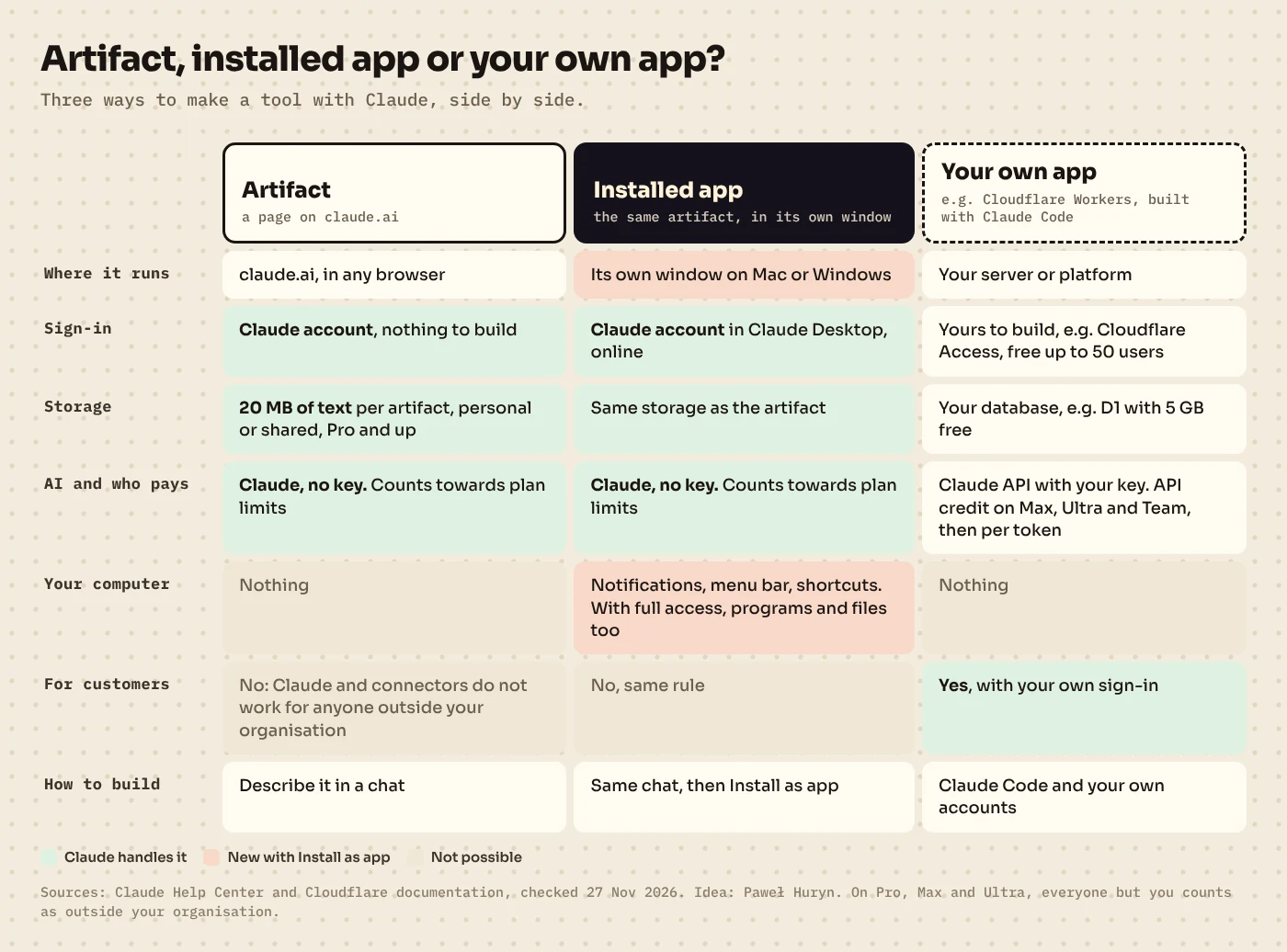
For anything customers or partners sign in to, the comparison Paweł Huryn published points to your own app. Built with Claude Code on a platform such as Cloudflare Workers, it gives you your own sign-in, a database where your code decides who sees what, and direct access to any API with your own keys. Cloudflare Access is free for up to 50 users and D1 includes 5 GB of storage on the free plan. The AI then runs on the Claude API, which Max, Ultra and Team plans have covered with a monthly API credit since 7 October 2026, with per-token pricing beyond it.
A starter policy for European organisations
- Decide before staff discover it. On Team the feature is already on. If you are not ready, switch Install as app off and pilot it with a small group. On Enterprise, decide who asks for it and why before an owner switches it on.
- Keep full access off by default. Grant it only for named use cases, and set isArtifactAppFullAccessEnabled to false on managed devices so personal accounts on company hardware are covered too.
- Ask builders for three things. A plain-language description in the artifact of which folders and programs the app touches, no code loaded from external sites, and a named owner who controls who can edit it.
- Treat personal data the usual way. If an app handles personal data, record it like any other processing, check whether it uses shared storage, and remember that ZDR does not apply.
- Watch usage. Every Claude call an app makes counts against the user’s limits. A dashboard that refreshes with Claude every few minutes is a budget decision.
- Send customer-facing ideas elsewhere. Anything for people outside the organisation needs its own app with its own sign-in.
The same questions came up when teams started sharing Claude Skills across an organisation: who wrote it, who can change it and who checked it. Install as app adds a fourth question, which is what it may do on the machine.
Frequently asked questions
Which Claude plans can install artifacts as apps?
All of them, in beta: Free, Pro, Max, Ultra, Team and Enterprise. On Team it is on by default with full access off. On Enterprise it stays off until an owner turns it on.
Does Anthropic review installed apps?
No. Anthropic does not review apps before installation, which is why full access is limited to apps written by you or, on Team and Enterprise, by colleagues in your organisation.
Can admins block the feature on personal accounts on company laptops?
Yes, with device policy. The MDM keys isArtifactAppsEnabled, isArtifactAppPermissionsEnabled and isArtifactAppFullAccessEnabled apply to every account on the computer and can only switch features off.
Does zero data retention cover installed apps?
No. Anthropic states that ZDR, whether organisation-wide or for Claude Code, does not cover these apps, and ZDR organisations start with the settings off.
Do installed apps work offline?
No. The user has to be online and signed in to Claude Desktop to open an app.
Every employee can now ship software
Install as app turns a chat into a distribution channel. The building is no longer the hard part, which leaves the questions that software governance was always about: who wrote this, who can change it and what is it allowed to do. Anthropic has answered the third with versioned consent and a full-access tier that is off by default. The first two are now yours, and for organisations already running Claude as an agent on employees’ computers, the sensible move is to write them down before the first full-access request arrives.