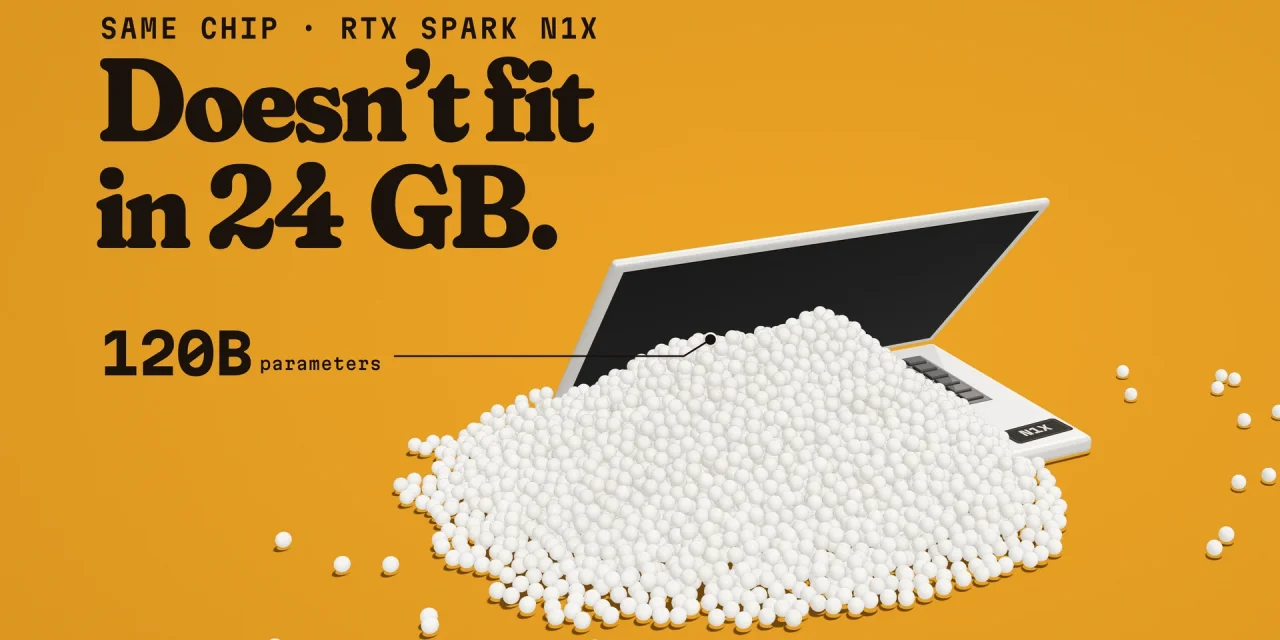
The RTX Spark N1X is Nvidia’s first PC processor for Windows 11 laptops: an Arm CPU and a Blackwell GPU on one chip, sharing up to 128 GB of memory. Since 16 October 2026 it has been shipping in laptops such as the Microsoft Surface Laptop Ultra, the ASUS ProArt P16 and the Dell XPS 16. Graphics performance sits around laptop RTX 4070 to 5070 level and efficiency is excellent, but the CPU cores are a generation behind Apple’s. For organisations, the real decision is memory: at 24 or 32 GB you are buying an expensive premium laptop, while at 64 and especially 128 GB you get a portable workstation that runs large AI models without sending data to the cloud.
This article covers what the chip is, which laptops use it and what they cost in euros, how it performs in early reviews, what IT teams need to check before rolling it out, and which roles in your organisation actually benefit.
What the RTX Spark N1X is

RTX Spark is the brand, N1X the chip. Nvidia unveiled it with Microsoft at GTC Taipei on 31 May 2026, and co-designed the CPU with MediaTek. It is essentially the GB10 chip from Nvidia’s DGX Spark AI mini computer, tuned for laptop power levels and running Windows 11 on Arm instead of Linux.
- CPU: 20 Arm cores (10 Cortex-X925 performance cores and 10 Cortex-A725 efficiency cores), or 18 in the smaller version.
- GPU: Blackwell RTX with 6,144 CUDA cores, or 5,120. Nvidia quotes up to 1 petaflop of AI compute at low FP4 precision, with sparsity.
- Memory: up to 128 GB of LPDDR5X on a 256-bit bus. At 9,400 MT/s that works out to about 300 GB/s, shared by CPU and GPU.
- NPU: 52 TOPS, as Microsoft confirmed to PCWorld.
| N1X 20-core | N1X 18-core | |
|---|---|---|
| CPU | 20 Arm cores (Grace) | 18 Arm cores (Grace) |
| GPU | 6,144 CUDA cores | 5,120 CUDA cores |
| AI compute | 1 petaflop | 827 teraflops |
| Memory | up to 128 GB | up to 32 GB |
| Power | 45 to 80 W | 45 to 80 W |
Source: Nvidia specifications. The cheaper 18-core variant stops at 32 GB, so any machine meant for large local models needs the 20-core chip.
Which laptops use it
Six PC makers opened pre-orders from 7 October, with the first units shipping from 16 October. Windows Central lists the US starting prices:
| Laptop | Display | US starting price | Shipping |
|---|---|---|---|
| Microsoft Surface Laptop Ultra | 15-inch mini-LED | $2,599 | 16 October |
| ASUS ProArt P14 | 14-inch | $2,599 | 16 October |
| ASUS ProArt P16 | 16-inch OLED | $2,799 | 16 October |
| HP OmniBook X 14 | 14-inch | $2,999 | 4 November |
| Lenovo Yoga 9n | 16-inch 2-in-1 | $3,099 | 16 October |
| HP OmniBook Ultra 16 | 16-inch OLED | $3,199 | 4 November |
| MSI Prestige N16 Flip AI+ | 16-inch tandem OLED, 2-in-1 | $3,299 | not announced |
| Dell XPS 16 Creator Edition | 16-inch OLED | $3,799 | 16 October |
Acer and Gigabyte follow later. Microsoft also sells a Surface RTX Spark Dev Box desktop with 128 GB for $5,999, in the US only. Note that Dell’s XPS 16 Creator Edition is offered with the smaller 18-core chip and 32 GB, at the highest starting price in the list (Notebookcheck).
What it costs in Europe
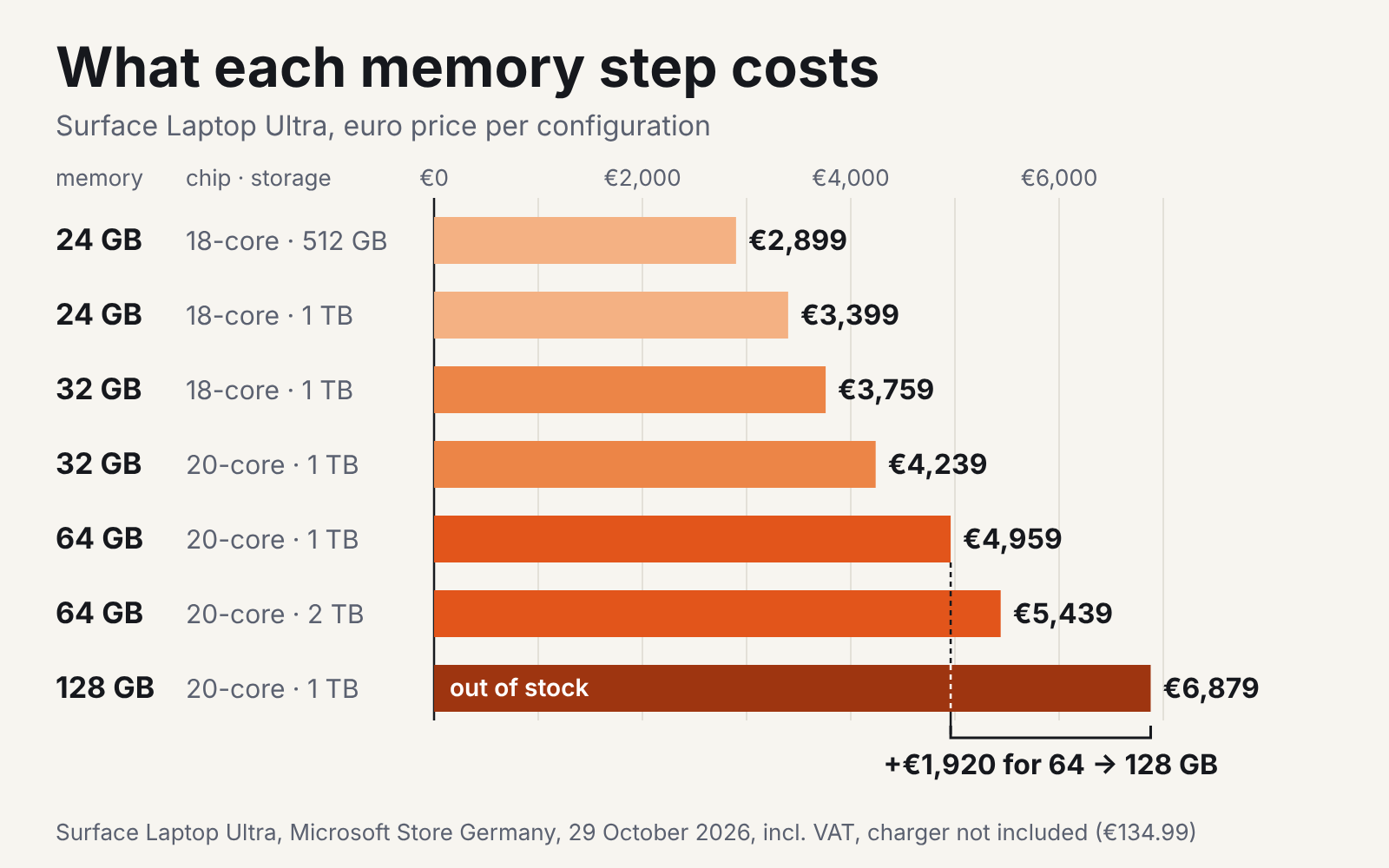
Euro prices were slow to appear. At launch, Microsoft’s Belgian page still redirected to the US store (ITdaily). The German Microsoft Store is a useful reference for the euro area. Prices including VAT on 29 October 2026:
| Chip | Memory | Storage | Price (Germany) |
|---|---|---|---|
| 18-core | 24 GB | 512 GB | €2,899 |
| 18-core | 24 GB | 1 TB | €3,399 |
| 18-core | 32 GB | 1 TB | €3,759 |
| 20-core | 32 GB | 1 TB | €4,239 |
| 20-core | 64 GB | 1 TB | €4,959 |
| 20-core | 64 GB | 2 TB | €5,439 |
| 20-core | 128 GB | 1 TB | €6,879 (out of stock) |
Budget for a charger as well. The German consumer store ships the Surface Laptop Ultra without one, and the 140 W Surface adapter costs €134.99 separately. Existing USB-C chargers that deliver 115 to 140 W also work. The ASUS ProArt P16 with 128 GB lists at around €6,699 at German retailers (Notebookcheck).
How it performs
The GPU is the strong point. In 3DMark Time Spy the N1X scores around 12,500, roughly RTX 4070 to 5070 laptop level (Windows Central, Notebookcheck). The CPU is less impressive: its Arm cores are 2024 designs. Multi-core performance is competitive with Apple’s M4 Pro (HotHardware, via Tech Times) and ahead of Intel’s Panther Lake and AMD’s Zen 5 chips, but Apple’s M5 Pro and M5 Max are 40 to 48 percent faster in Cinebench 2024 multi-core and over 50 percent faster in single-core (Notebookcheck).
Efficiency is where the platform stands out. Running Cyberpunk 2077, the Surface drew 133 to 144 W at the wall, against 261 to 305 W for heavy ASUS and MSI gaming laptops with an RTX 5090 or 4090 (PCWorld). An entry-level gaming laptop with an RTX 5060 drew less, 115 to 117 W. Performance stays almost the same on battery. Battery life depends heavily on the workload: about 9 hours of video on the Surface and 12 on the ProArt P16 in Linus Tech Tips’ test (via WindowsForum), around 10 hours in PCWorld’s office test on the Surface, and under an hour on the Surface with the GPU at full load.
Memory decides what runs locally

For AI work, memory matters more than raw compute. A language model has to fit in memory to run well. A typical gaming laptop GPU is limited to 8 to 24 GB of video memory, while the N1X GPU draws from the shared pool. On the 128 GB version it gets 64 GB by default, and that allocation can be raised for larger models (Windows Central, Notebookcheck). Smaller configurations split differently.
| Memory | What fits locally (examples) |
|---|---|
| 24 GB | small models of 9 to 12 billion parameters, such as Qwen3.5-9B or Gemma 4 12B at 4-bit |
| 32 GB | gpt-oss-20b, Gemma 4 12B at 8-bit |
| 64 GB | mid-sized models such as Qwen3.8-27B or Qwen3.6-35B-A3B at 8-bit, if you give the GPU a larger share |
| 128 GB | large models of around 120 billion parameters, such as gpt-oss-120b or Qwen3.5-122B-A10B |
Source: vdf.ai, based on common open model file sizes. Speed is the second question. When generating text, memory bandwidth sets the tokens per second. At about 300 GB/s the N1X matches Apple’s M5 Pro but has about half the bandwidth of the top M5 Max (614 GB/s). Windows Central measured 49 tokens per second with Llama 3.1 8B. For gpt-oss-120b on a laptop there are no measurements yet; vdf.ai estimates about 36 tokens per second. The 140 W DGX Spark with the same chip measures 58.7, well above what vdf.ai’s model predicts for it (ComputingForGeeks), so the laptop may beat that estimate.
The memory is soldered, so the choice you make at purchase lasts for the life of the device, while open models tend to grow rather than shrink.
Why local AI matters for European organisations
Nvidia and Microsoft position these machines for local AI agents that act on files and apps on the device. Microsoft places the Surface Laptop Ultra in a new “builder PC” category alongside its Copilot+ PCs (ITdaily), aimed at creators, developers and AI builders. Windows Central had the open Hermes Agent tidy up a downloads folder without a single cloud token. For European organisations, that local option has three practical advantages:
- Data stays on the device. Prompts, documents and outputs need not leave the laptop, which simplifies GDPR assessments and avoids international transfers for that workload. You still need a lawful basis and clear rules for what staff process, just as with any other tool.
- Open models become usable. With 64 to 128 GB you can run strong open-weight models, which gives you an alternative to US cloud APIs. Check each model’s licence first, as we did for Liquid AI’s LFM3. The very largest open models still do not fit: Meta’s Muse Spark Open needs far more memory than any laptop offers.
- Development mirrors production. Since CUDA 13.4 in September, Nvidia’s platform runs natively on Windows on Arm. CUDA kernels compiled for DGX Spark target the same GPU architecture and should carry over, although Windows builds need recompiling and some APIs behave differently. That makes the laptop a realistic place to prototype before deploying on Nvidia hardware.
Local does not mean free of oversight. If staff use local agents that act on company files, the same questions apply as for a dedicated agent machine like Ghost’s AI PC Core: which folders can it touch, what does it log, and who approves its actions?
What IT should check before rolling it out
| Area | Status in October 2026 | What to do |
|---|---|---|
| App compatibility | Most x86 apps run through Prism emulation; software with its own drivers needs an Arm version | Test VPN, endpoint security, printing and line-of-business apps before buying in volume |
| Copilot+ features | Recall, Click To Do and semantic search are not available at launch; Microsoft says it is working with Nvidia to bring them to the NPU | Do not base the business case on Copilot+ features yet |
| Linux | Not officially supported on the laptops; WSL2 is the nearest option, but not yet reliable for every workload | Teams that need native Linux are better served by DGX Spark |
| Early bugs | PCWorld saw app crashes that disappeared after a security update, though the cause was never confirmed; Premiere initially did not recognise the GPU | Keep drivers and Windows current; pilot before scaling |
| Hardware | Memory soldered; Surface has a replaceable SSD, ProArt P16 has two SSD slots and a three-year warranty | Buy the memory you will need in three years |
| Business models | Microsoft sells a Surface Laptop Ultra for Business with Windows 11 Pro, protection plans of up to four years and, in some markets, a charger in the box | Check which configurations and support terms your reseller offers |
Who should get one
| Role | Fit | Suggested memory |
|---|---|---|
| AI engineers and developers working with CUDA | Strong | 64 or 128 GB |
| Analysts working with sensitive data who want local models | Good | 64 GB |
| Creators using Photoshop, Premiere Pro or Blender | Good, these apps get Nvidia acceleration, though Premiere Pro still ran only in beta in PCWorld’s test | 32 GB or more |
| Office, sales and management staff using cloud AI | Poor value | Not needed |
| Anyone who needs maximum tokens per second | A MacBook Pro with M5 Max is faster | n/a |
A sensible approach is a small pilot: two or three 64 GB or 128 GB units, your own apps and models, and a comparison of what the same workload costs in cloud tokens. That tells you within a month whether local AI saves money or mainly buys control.
Frequently asked questions
Can you buy RTX Spark laptops in Europe?
Yes. Microsoft sells the Surface Laptop Ultra through Microsoft.com and selected retailers, starting at €2,899 in Germany, and ASUS ProArt models are listed at European retailers. Availability per country still varies.
Can the memory be upgraded later?
No. The LPDDR5X memory is soldered to the board.
How does it differ from DGX Spark?
DGX Spark uses the same chip at 140 W instead of 45 to 80 W, runs Linux and has fast networking to link several units. RTX Spark laptops run Windows 11 and are built to be carried.
Does it support Copilot+ features?
Not at launch. Microsoft says it is working with Nvidia to bring Recall, Click To Do and semantic search to the NPU (Windows Central).
Buy the memory, not the badge
RTX Spark proves a Windows laptop can be a serious AI machine: a laptop RTX 4070 to 5070-class GPU that keeps nearly all its speed on battery, and up to 128 GB of shared memory for models that do not fit on any ordinary laptop. For European organisations it also offers a credible way to keep AI workloads and data on their own hardware. But the chip alone does not make a workstation. The €2,899 entry model is a fast, expensive laptop with CPU cores from 2024. What makes the difference is the memory configuration, and that cannot be changed once you have bought it.