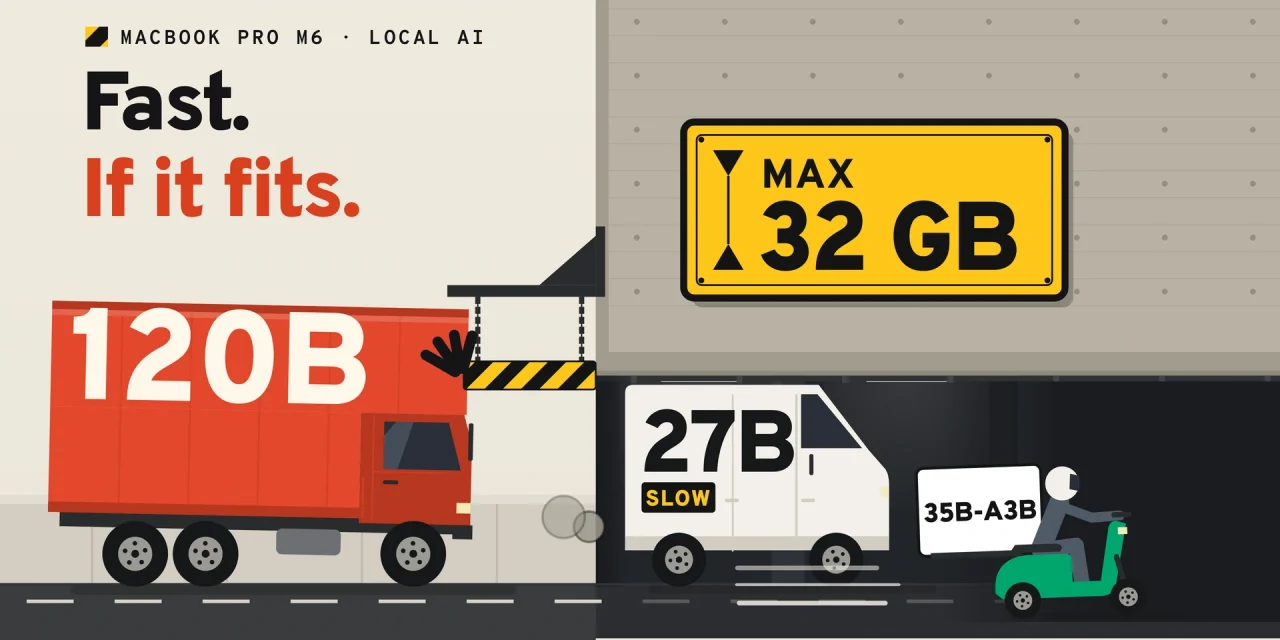
The new 14-inch MacBook Pro with M6 can run capable AI models entirely on the laptop, up to roughly 35 billion parameters. It reads prompts three to four times faster than an M4 and writes answers at roughly 8 to 70 tokens per second, depending on the model. The catch is memory: it tops out at 32 GB. For organisations, that makes the M6 a sensible machine for private, offline AI on everyday tasks, and the wrong one for teams that want to run large models locally. Those teams need the new MacBook Pro with M5 Pro or M5 Max.
Below is what Apple launched this week, why memory matters more than the chip, which models fit in 16, 24 and 32 GB, how fast they run in independent tests, and how to match configurations to roles in your organisation.
What Apple announced on 27 and 28 October
On 27 October Apple introduced the 14-inch MacBook Pro with M6, the entry model of the Pro line. The chip has 12 CPU cores and 12 GPU cores, two more of each than the M5, and is built on a 2-nanometre process. Every GPU core contains a Neural Accelerator for AI maths, alongside a dual 16-core Neural Engine.
The next day Apple unveiled a redesigned MacBook Pro with a tandem OLED touchscreen in 14 and 16 inches. It does not use the M6. It keeps the M5 Pro and M5 Max, with up to 128 GB of memory, and replaces the previous mini-LED Pro and Max models. There is no M6 Pro or M6 Max yet.
| MacBook Pro 14″ M6 | MacBook Pro M5 Pro (OLED) | MacBook Pro M5 Max (OLED) | |
|---|---|---|---|
| Memory | 16, 24 or 32 GB | up to 64 GB | up to 128 GB |
| Memory bandwidth | 153 GB/s (16 GB) or 170 GB/s | 307 GB/s | up to 614 GB/s |
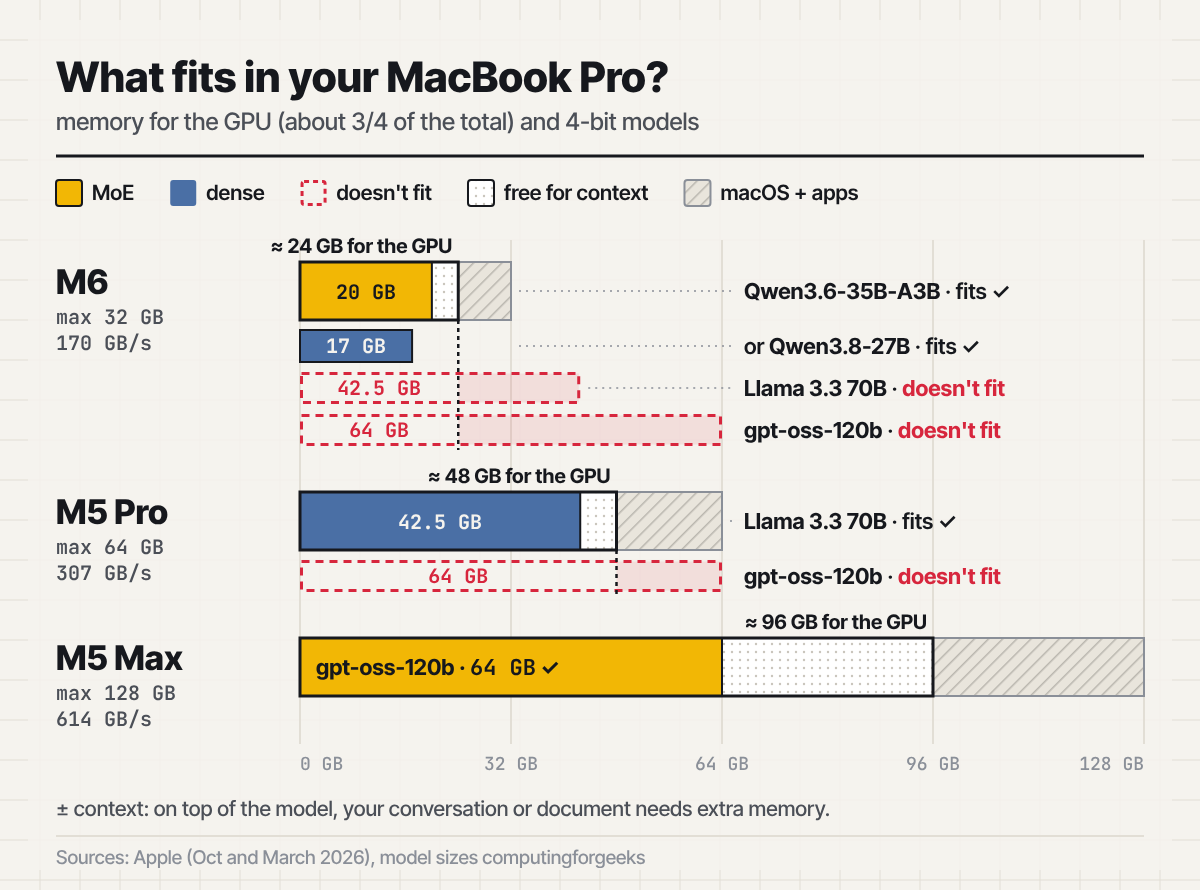
| Largest model that fits comfortably (4-bit) | about 30 to 35B | 50 to 70B (70B is tight) | about 120B |
| Thunderbolt | 4 | 5 | 5 |
| Starting price | $1,999 · £1,999 · €2,299 (France) · €2,329 (Netherlands) | $2,899 (14″) | $4,499 (14″) |
The M6 model can be ordered now and ships on 6 November. In the Netherlands, iCulture lists €2,329 for 16 GB and 1 TB, plus €220 for 24 GB or €440 for 32 GB. French pricing starts at €2,299. Apple’s press release lists only US prices for the OLED models.
Why companies want models on the laptop
Running a model locally means prompts, documents and answers never leave the device. For a legal team summarising contracts, an HR department sorting applications or an engineer working on unreleased code, that removes one third party from the data flow and one more contract to negotiate. It also works on a train or in a client’s building without network access, and the cost per token is zero once the hardware is paid for.
Local is not a compliance shortcut, though. Processing personal data on a laptop is still processing under the GDPR, and the laptop needs disk encryption, device management and a policy on which models staff may install. What local AI does change is where the risk sits: on endpoints you already manage, rather than on an external service you have to assess.
Local models are also smaller than frontier cloud models. They are good at summarising, extracting, classifying, translating and completing code. For complex reasoning or long agentic tasks, cloud models remain stronger. Most organisations will end up using both.
Why memory decides, not the chip

A language model works in two phases, and each one stresses a different part of the computer.
First the model reads your prompt. That is pure computation, and it is where the M6 shines. The Neural Accelerators in the GPU are built for exactly the matrix maths involved. Apple claims the first token arrives up to 1.3 times faster than on the M5 and up to 13 times faster than on an M1. With a long input, such as a 20-page document or a code repository, you notice it straight away.
Then the model writes its answer, one token at a time. For every token, the chip has to read all the active weights of the model from memory once. Speed therefore depends on memory bandwidth. A useful rule of thumb: divide bandwidth by model size to get the maximum tokens per second. A 17 GB model on an M6 with 170 GB/s will manage about ten.
The model also has to fit. By default, macOS gives the GPU about three quarters of unified memory, leaving the rest for the operating system and other apps. On a 32 GB machine that means around 21 to 24 GB for the model and its context. The limit can be raised with sysctl iogpu.wired_limit_mb, but Apple does not support that and it is not something to roll out across a fleet.
The M6’s compute took a big leap. Its bandwidth barely moved, from 153 to 170 GB/s, and according to Apple’s specifications the 16 GB base model stays at 153 GB/s. For comparison, the M1 Max offered 400 GB/s back in 2021.
How fast is the M6 in practice?
Independent laptop reviews are not out yet. But the Mac mini M6 uses the same chip and has been on sale since 22 September, so there is real data.
Testing Qwen3.5-9B at 4-bit, YouTuber Alex Ziskind measured prompt processing at 742 tokens per second on the M6 against 210 on an M4, 3.5 times faster. The first token appeared after 0.7 seconds instead of 2.5. Generation improved less, from 18 to 26.9 tokens per second, as Wccftech reported. A Flux image took 36 seconds instead of 94. The M6 Mac mini drew about 38 watts, against 44 for the M4.
A broader test published on GitHub ran 16 models on a 32 GB Mac mini M6 in LM Studio on 3 and 4 October. The pattern is clear.
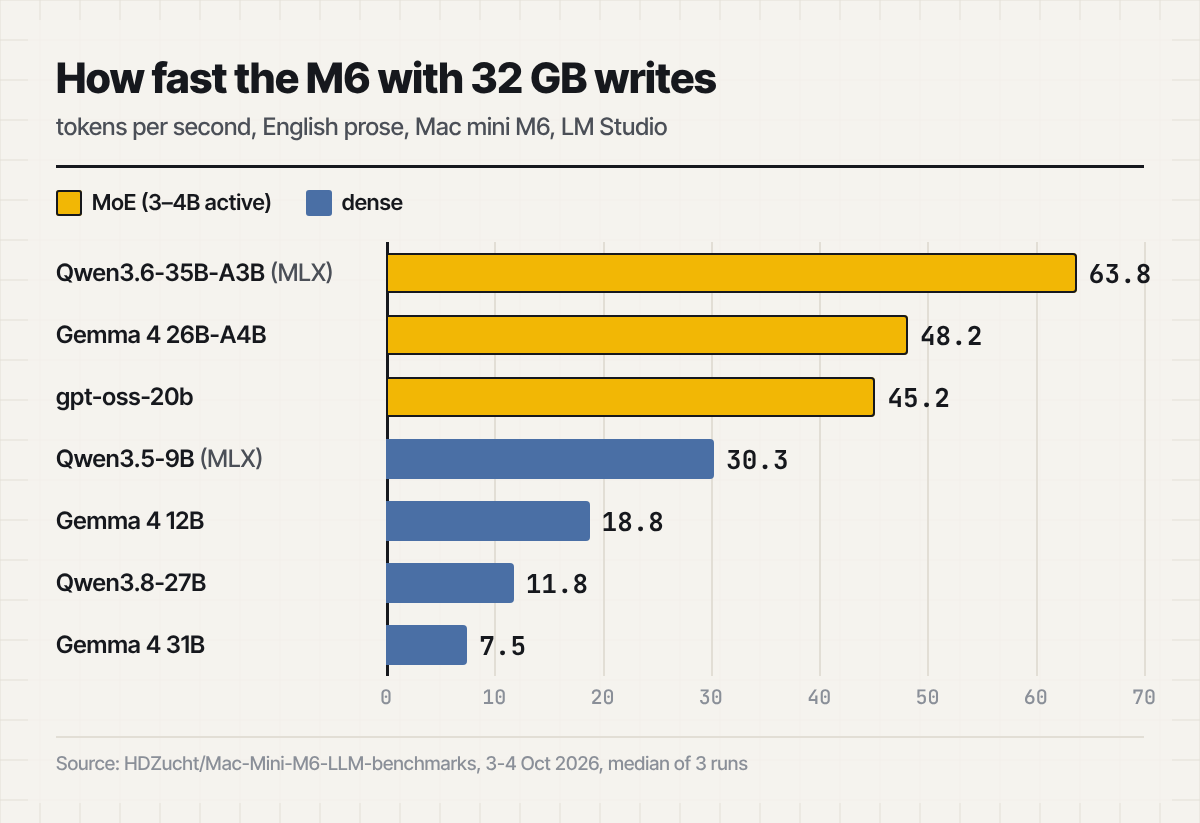
- Mixture-of-experts models fly. They use only a small share of their parameters per token. Qwen3.6-35B-A3B, with 3 billion of its 35 billion parameters active, reached 63 to 69 tokens per second in MLX format. gpt-oss-20b and Gemma 4 26B-A4B ran at around 45 to 53.
- Large dense models crawl. Qwen3.8-27B managed 11 to 12 tokens per second on prose, Gemma 4 31B under 8. Usable, but you wait for every answer.
- Speculative decoding helps on predictable text. With a small draft model guessing ahead, Qwen3.8-27B jumped to 45 to 68 tokens per second on code and JSON. On prose the gain was more modest, from about 11 to 15 to 20 tokens per second.
Measured bandwidth also falls short of Apple’s figure. Ziskind’s STREAM test gave 143 to 145 GB/s on a 32 GB M6, according to Starry Hope, which is why dense 27B models top out at roughly 9 to 12 tokens per second in these tests.
One caveat: a Mac mini has a large fan and does not sit on a lap. Whether the laptop sustains the same pace under long workloads will only be clear after reviews. Notebookcheck found that CPU performance of the 14-inch M5 Max dropped 24 percent after half an hour at full load. The M6 draws far less power, so we expect fewer problems.
Which configuration for which role
For a model at 4-bit, budget about 0.6 GB per billion parameters, plus room for context. The longer the conversation or document, the more memory the context takes.
| Role | Typical local use | Configuration |
|---|---|---|
| Knowledge workers handling confidential documents | summarising, extracting, translating with a 20 to 35B mixture-of-experts model | M6 with 32 GB |
| Staff who only need the built-in tools | Apple Intelligence and Apple’s on-device model | M6 with 16 or 24 GB, or a MacBook Air |
| Developers running local coding agents | a 30 to 50B model next to Docker, a browser and an IDE | M5 Pro with 64 GB |
| AI and data teams testing open models | models around 120B, long context, fine-tuning experiments | M5 Max with 128 GB, ideally the 16-inch (it ran cooler in the previous generation), or a Mac Studio |
Two practical points for IT. Memory sits in the chip package and cannot be upgraded, so the choice at purchase holds for the life of the laptop. And the 16 GB M6 is a poor fit for local AI: it has the slower memory and leaves room only for models up to about 12 billion parameters once a browser and a few apps are open. Recursive’s coding model Flint, for instance, is 23 GB at 4-bit and targets Macs with at least 48 GB, which rules out every M6.
Teams that want to pool several Macs to run one very large model need Thunderbolt 5 for the fast RDMA connection Apple uses. Apple showed four Mac Studios running the open Muse Spark Open model together over RDMA. The M6 MacBook Pro has Thunderbolt 4.
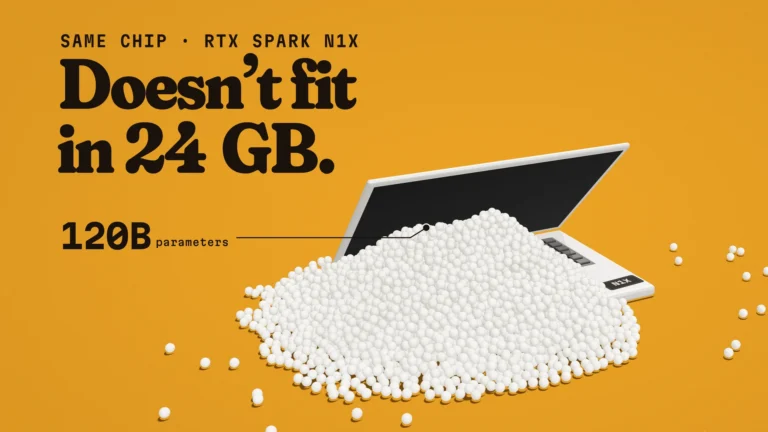
Windows fleets have an alternative in Nvidia’s RTX Spark N1X laptops, with up to 128 GB of memory at about 300 GB/s, close to an M5 Pro, though at a high price.
Getting started
- Start with what is already installed. macOS 27 ships Apple’s own on-device language model of about 3 billion parameters, reachable through the
fmcommand in Terminal. It is intended for summarising, extraction and classification, not for reasoning or code. - Use LM Studio with MLX models. MLX is Apple’s machine learning framework and often runs faster on Apple silicon than the GGUF format of llama.cpp. Ollama works too: since version 0.40 in late September it runs supported models such as Qwen and Gemma on its faster MLX engine by default. The first preview in March still required a Mac with more than 32 GB.
- Pick mixture-of-experts models. On the M6, Qwen3.6-35B-A3B, gpt-oss-20b and Gemma 4 26B-A4B give the best balance of quality and speed. For narrow agent tasks, much smaller models such as Liquid AI’s LFM3 need as little as 1 GB.
- Keep context sizes in check. Loading a model with a 128,000-token context can take more memory than the model itself. Start at 16,000 to 32,000.
- Keep an approved model list. Record which models and versions staff may run, where they were downloaded from and under which licence, the same way you track other software.
Frequently asked questions
Can the memory of the M6 MacBook Pro be upgraded later?
No. Memory is part of the chip package. Whatever you order is what the laptop keeps. When in doubt, choose 32 GB.
Is the M6 faster for AI than an M4 Pro or M3 Max?
For reading prompts, yes, thanks to the Neural Accelerators. For writing answers, no: an M4 Pro offers 273 GB/s and an M3 Max up to 400 GB/s, well above the M6’s 170 GB/s. If your users mostly generate long answers with large models, an older Pro or Max machine with plenty of memory can be the better buy.
Can the M6 run gpt-oss-120b?
No. At 4-bit the model is over 60 GB and does not fit in 32 GB. It needs an M5 Max with 128 GB or a Mac Studio.
Does local AI make a laptop GDPR-compliant?
Not on its own. It keeps data on the device, which simplifies the data flow, but you still need a legal basis, security controls and a record of what the model processes.
Choose the model first, then the Mac
The M6 makes local AI faster at the moment users notice most: they ask a question about a long document and the answer starts almost immediately. But how large a model a laptop can run is fixed on the day you buy it. So decide first which models your teams need. If they fit in about 24 GB, a 32 GB M6 is a fast, frugal and private AI laptop. If they do not, buying the cheapest Pro saves nothing. And if the goal is agents that run around the clock rather than on a laptop that closes at six, a dedicated box such as Ghost’s AI PC may be the better fit.