It sounds like a joke. Naming a sophisticated software engineering methodology after the simplest, glue-eating character from The Simpsons seems counterintuitive. Yet, the Ralph Wiggum technique has emerged as one of the most effective ways to manage autonomous AI coding agents. It is not about being the smartest entity in the room; it is about relentless, naive persistence until the job is done.
If you have been experimenting with tools like Claude Code, Cursor, or other CLI-based agents, you have likely hit a wall. The agent starts strong, but after twenty minutes of back-and-forth, it gets confused, forgets instructions, or hallucinates non-existent libraries. This is the problem Ralph Wiggum solves. It is a method that embraces the chaotic nature of LLMs by forcing them into a rigid, self-correcting loop.
What is the Ralph Wiggum Technique?
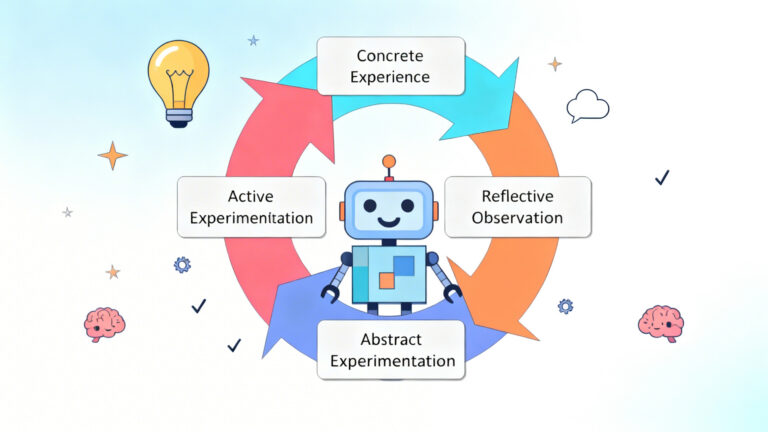
At its core, the Ralph Wiggum technique is an iterative AI development methodology. In its purest form, it is a simple Bash while loop that repeatedly feeds an AI agent a prompt until a specific completion criteria is met.
The philosophy is simple: Iteration > Perfection.
Instead of trying to craft the perfect “one-shot” prompt to build an entire application, you set up a system where the AI takes a small step, verifies its work, terminates, and then starts fresh for the next step. It is “deterministically bad in a non-deterministic world.” By accepting that the AI will make mistakes, you build a harness that expects failure and simply retries or corrects course in the next iteration.
The technique fundamentally changes the role of the developer. You stop being the person writing the code or even the person constantly chatting with the bot. You become the architect of the loop, defining the boundaries and the definition of “done,” and then you step away from the keyboard (AFK) while Ralph does the work.
The Origin Story: From Goats to Code
The technique was popularized by Geoffrey Huntley, a software engineer (and jokingly self-proclaimed goat farmer) who realized that the economics of software development had fundamentally shifted. In mid-2025, Huntley demonstrated the power of this technique by creating “Cursed Lang,” a fully functional programming language based on Gen Z slang (where keywords included terms like “slay” and “sus”).
He didn’t write the compiler himself. He set up a loop. He gave an agent the instructions, let it run overnight, and woke up to a working compiler written in Rust (and later self-hosted in Cursed Lang itself).
The name “Ralph Wiggum” was chosen to embody the spirit of the agent. Ralph is not a genius. He is happy to help, often oblivious to danger, and keeps trying regardless of the outcome. When you run an AI agent in a loop, it behaves exactly like Ralph: it happily churns through tasks, occasionally doing something silly, but eventually stumbling upon the correct solution through sheer volume of attempts and correction.
Why “Ralph”? The Philosophy of the Fresh Context
To understand why this technique works better than standard AI chat interfaces, you have to understand “Context Rot.”
When you use a standard interface like ChatGPT or the default Claude Code behavior, you are working in a single, continuous session. As the conversation grows, the “context window” (the amount of text the AI can remember) fills up. To manage this, systems use “compaction”—they summarize older parts of the conversation to make room for new tokens.
Compaction is lossy. The AI starts to forget the specific instructions you gave it at the start. It enters what Huntley calls the “Dumb Zone.” It starts making regression errors, forgetting file structures, and writing bad code.
The Ralph Wiggum technique solves this by deterministically mallocing the array.
In the Ralph approach, every iteration of the loop is a fresh start. The agent does not remember the previous chat history. Instead, it reads the current state of the file system (the code, the plan, and a progress log).
- Start Loop: The agent spins up with a fresh, empty brain.
- Read State: It reads
plan.md(what needs to be done) andprogress.txt(what was just finished). - Execute One Task: It picks the highest priority item, implements it, and runs tests.
- Commit & Exit: It commits the code to Git and terminates.
- Repeat: The loop restarts. The next agent sees the new code and the updated plan, but carries no “baggage” from the previous session.
This ensures that the agent is always operating at peak intelligence, with zero context rot.
How It Works: The Mechanics of the Loop
While Anthropic released an official “Ralph Wiggum” plugin for Claude Code, purists (including Huntley) argue that the official plugin misses the point. The plugin often keeps the agent in the same context window, merely automating the “continue” button. The “True Ralph” is a script you run yourself.
The Essential Components
To implement a Ralph loop, you need three main things:
1. The Specs and The Plan
You cannot just tell Ralph to “build an app.” You need a Product Requirements Document (PRD) or a specification file. This is usually broken down into a plan.md or todo.md file. This file acts as the shared memory between the independent agent sessions. It lists tasks, their status (pending/done), and priority.
2. The Prompt (PROMPT.md)
This is the static instruction set fed to the agent every time it wakes up. It tells the agent:
- “You are an expert engineer.”
- “Read
plan.mdto see what needs to be done.” - “Pick the next incomplete task.”
- “Implement it and run tests.”
- “Update
plan.mdto mark it as complete.” - “If everything is done, output the text:
<promise>COMPLETE</promise>.”
3. The Bash Loop (The Engine)
This is the script that keeps Ralph running. It looks something like this (conceptually):
while true; do
  # Run the agent with the prompt
  output=$(claude --prompt "$(cat PROMPT.md)")

  # Check for the exit condition
  if echo "$output" | grep -q "<promise>COMPLETE</promise>"; then
    echo "Ralph is finished!"
    break
  fi

  # Optional: Check for errors or max iterations
done
This loop creates a relentless worker. If the tests fail, the agent (in the next loop) sees the failure and tries to fix it. If the implementation is wrong, the next loop refactors it.
How to Get the Most Out of Ralph
Running an infinite loop with an AI that costs money per token requires some safeguards and strategy. You don’t want to wake up to a $500 bill and a deleted hard drive. Here is how to optimize the technique.
1. Sandboxing is Non-Negotiable
Ralph is “dumb.” If it decides that the best way to fix a bug is to delete your home directory, it might try. Always run Ralph inside a Docker container or a restricted environment. Tools like Claude Code have a --dangerously-skip-permissions flag, which is necessary for autonomous loops, but it should only be used when the agent is isolated from your critical system files.
2. Feedback Loops are Your Safety Net
Ralph needs to know if he did a good job. Since you are not there to tell him, the code must do it. You need a robust test suite.
Your prompt should explicitly instruct the agent to run tests after every change. If the tests fail, the agent should not mark the task as complete. This creates a self-healing mechanism. If Ralph breaks the build, the next Ralph sees the broken build and his only job is to fix it. Without tests, Ralph will happily hallucinate that the code works and mark everything as “Done.”
3. Small Steps Prevent Hallucinations
Do not ask Ralph to “Refactor the entire database layer” in one go. That is too big for a single context window. Break your plan.md into granular tasks: “Create migration file,” “Update User model,” “Fix login controller.”
The smaller the task, the higher the success rate. Remember, Ralph starts fresh every time. If a task requires knowledge of 50 different files, he will burn tokens just reading them. If the task is isolated, he can execute it with surgical precision.
4. The “Human on the Loop” vs. “Human in the Loop”
While the goal is AFK coding, you should start with “Human on the Loop.” Watch the first few iterations. See if Ralph is understanding the plan. If he gets stuck in a loop of failure (trying the same wrong fix three times), kill the process, update the PROMPT.md or the plan.md with better instructions, and restart.
Once you trust the trajectory, you can walk away. This shifts your role from “coder” to “manager.” You are managing a junior developer who works at the speed of light but has no long-term memory.
5. Cost Management
Set a max_iterations limit. Even if you want it to run overnight, cap it at 50 or 100 loops. This prevents a runaway process from draining your API credits if it gets stuck on a particularly stubborn error.
The Economic Shift: Software Development vs. Engineering
The rise of the Ralph Wiggum technique signals a shift in the industry. As Huntley points out, “software development” (the act of writing code) is becoming cheap. It is approaching the cost of electricity. You can now generate thousands of lines of code for the price of a coffee.
However, “software engineering” (designing the system, defining the constraints, ensuring safety) is becoming more valuable. The code itself is a commodity; the architecture of the loop is the asset.
We are moving away from carrying cargo by hand to becoming locomotive engineers. We keep the train on the tracks while the engine (Ralph) does the heavy pulling. The developers who succeed in this new era will not be the ones who can type the fastest, but the ones who can write the best specifications and design the most robust feedback loops for their agents.
Embrace the Chaos
There is something liberating about the Ralph Wiggum technique. It admits that AI is flawed. It admits that code is messy. Instead of fighting for perfection in a single prompt, it embraces the grind. It allows you to build complex systems by stacking simple, imperfect bricks on top of each other, smoothed over by the mortar of endless iteration.
So, set up your specs, write your bash loop, and let Ralph loose on your backlog. He might be slow, he might be a little clumsy, but he will keep working long after you have gone to sleep. And in a world of hyper-optimized, over-engineered AI tools, sometimes the smartest thing you can do is be a little bit dumb.